How to Choose the Perfect AI Automation Agency in Australia

Artificial intelligence (AI) is helping Australian businesses streamline operations, improve customer experiences and reduce repetitive manual tasks. From automating administrative workflows to connecting business systems, AI automation enables organisations to use their time and resources more effectively.

However, achieving these benefits requires more than simply choosing an AI tool. Businesses need solutions that align with their workflows, integrate with existing systems and support their long-term objectives.

Choosing the right AI automation agency in Australia is an important business decision. The right partner can identify automation opportunities, develop a practical implementation strategy and deliver solutions tailored to your business requirements.

What Does an AI Automation Agency Do?

An AI automation agency helps companies find tasks that can be improved with intelligence, workflow automation and software integration. Depending on the project, the agency’s services might involve planning, building, putting into action and offering support.

Common AI automation applications are:

Workflow automation: Cutting down on repeated tasks like data entry, document handling and internal messages.

Customer service automation: Using AI assistants and chatbots to deal with questions and send customers to the right information.

Sales and marketing automation: Assisting with checking leads, following up grouping customers and managing campaign processes.

Business system integration: Linking CRM tools, online stores, accounting programs and other business apps.

Document processing: Taking out and arranging details from forms, bills and other business papers.

AI-powered reporting: Helping groups sort business information and spot trends in their data.

Not every task needs AI. In some situations fashioned rule-based automation might be more dependable, cheaper and easier to fix. A good agency should talk about which method is best for each situation.

7 Factors to Consider When Choosing an AI Automation Agency in Australia

1. Look for Relevant Industry and Technical Experience

Start by evaluating whether the agency understands your business operations and has experience with projects like yours.

An organisation in healthcare may need appointment workflows, controlled access to information and careful privacy management. A retail business might prioritise inventory updates order processing and customer communication. A professional services firm may want to automate document handling and administrative tasks.

Ask providers:

Have you delivered projects involving similar business processes?

Can you demonstrate case studies or examples?

Which AI models, automation platforms and integration technologies do you work with?

How do you assess whether a proposed solution is suitable for our requirements?

Look beyond technology demonstrations. Relevant experience, sound implementation practices and an understanding of your challenges are more useful indicators of suitability.

2. Choose an Agency That Understands Your Business Goals

AI automation should solve a defined business problem rather than introduce technology simply because it is available.

Before approaching an agency, identify the tasks that consume the time, create recurring errors or delay service delivery. These may include processing enquiries, updating customer records, preparing reports or transferring information between systems.

A good provider will help you establish objectives, such as:

Reducing the time required to complete a routine task.

Improving response times for customer enquiries.

Reducing data entry and duplication.

Improving consistency across business workflows.

Giving employees time for higher-value work.

Ask how the agency will measure success and what baseline information is needed before implementation. Clear performance indicators make it easier to evaluate the project’s business value.

3. Check Integration With Your Existing Systems

Many businesses already rely on software platforms. An AI automation solution that operates separately from these systems may create work instead of removing it.

Before selecting an AI automation company in Australia, discuss how its proposed AI automation solution will work with your existing technology.

Depending on your requirements, integrations may involve:

  • Customer relationship management (CRM) systems.
  • E-commerce platforms such as Shopify.
  • Accounting and invoicing software.
  • Customer support and communication tools.
  • Enterprise resource planning (ERP) systems.
  • Databases, reporting platforms and business applications.

Ask whether the provider uses existing APIs, approved connectors or custom integrations. You should also understand how errors, duplicate records, system outages and changes to third‑party platforms will be managed.

The objective is to create a workflow that fits your operations without adding unnecessary complexity.

4. Prioritise Data Security, Privacy and Responsible AI

Security should be considered from the beginning of an AI automation project, especially when personal information, confidential documents or sensitive data are involved.

Australian businesses should assess how a proposed AI automation solution handles data collection, access, storage, processing and retention. Where applicable, consider obligations under the Privacy Act 1988, the Australian Privacy Principles and any industry‑specific requirements relevant to your organisation.

Questions worth asking include:

Where will business data be? Processed?

Who can access the information used by the automation?

Will information be sent to AI providers?

How are authentication, permissions and access controls managed?

What data retention and deletion policies apply?

How are AI outputs reviewed for accuracy and potential errors?

What happens if the system produces a result or becomes unavailable?

An agency should explain the risks and controls in plain language rather than making broad claims that an AI system is automatically secure or compliant.

5. Understand Pricing, Scope and Expected Value

AI automation costs vary depending on the complexity of the workflow, the number of systems involved, data quality, security requirements and the level of support.

Some projects may involve an integration while others require custom software, complex business rules or extensive testing.

When comparing proposals, check whether the quoted price covers:

  • Discovery and requirements analysis.
  • Solution design and development.
  • Software licences and third‑party usage fees.
  • System integrations and data preparation.
  • Testing, deployment and staff training.
  • Documentation, maintenance and ongoing support.

Do not compare providers by price. A lower‑cost proposal might leave out integration or maintenance work while a higher‑cost proposal might bring services that your business does not need.

Ask for a list of one‑off costs and recurring costs. Whenever possible, estimate the return by matching implementation and operating costs with savings, better capacity or other business benefits.

Do not trust guaranteed savings or fixed return‑on‑investment claims unless they are backed by proof that fits your situation.

6. Request Evidence, Case Studies and References

An agency’s portfolio can help you understand its capabilities. The useful examples explain the business problem the solution implemented and the results measured.

When reviewing case studies, look for information about:

  • The workflow and its challenges.
  • The integrations involved.
  • Implementation. Limitations.
  • How success was measured.
  • Lessons. Ongoing maintenance needs.

Ask whether the provider can share references or examples to your industry and project size.

If detailed case studies are unavailable, consider starting with a proof of concept. This allows your team to test the approach, assess the quality of the results and identify risks before committing to an implementation.

7. Evaluate Support and Scalability

AI automation is rarely a set-and-forget proposition. It often requires close attention. Before signing any agreements, establish what happens post-launch. 

A suitable agency should be able to explain their approach to monitoring, troubleshooting, system updates, documentation and performance reviews. You also need to know who is responsible for resolving issues and how quickly support is expected to respond. 

You need to consider if the proposed solution will be able to accommodate workflows, users, data volumes and integrations as your organisation grows. 

Clear ownership, clear ownership, good documentation, good documentation and a practical maintenance plan can reduce the risk of becoming tied to a system only its original developer knows. 100 words

Which Business Processes Can AI Automation Improve?

The best starting point depends on where your business experiences recurring delays, high manual workloads or avoidable errors.

Business area Potential automation Possible benefit
Customer service Answering routine questions and routing enquiries More consistent initial responses
Sales Lead qualification and follow-up reminders Better visibility of sales opportunities
Administration Document classification and data extraction Less repetitive data entry
Ecommerce Order notifications and system updates More connected operational workflows
Finance Invoice data extraction and approval routing Faster document handling
Reporting Collecting and summarising business data Less time spent preparing reports
Human resources Onboarding checklists and internal requests More consistent administrative processes

These are examples rather than guaranteed outcomes. Results depend on the quality of the data, the complexity of the workflow and how well the solution is implemented.

A sensible first project usually addresses a process that is repetitive, measurable and manageable in scope.

How Much Do AI Automation Services Cost in Australia?

There is no fixed price for AI automation services in Australia. The cost of AI automation services changes depending on the tasks you want to automate and how the AI automation services solution must connect to your systems.

A simple workflow that links two business apps often requires more work to build than a custom AI assistant. That kind of AI assistant might read documents, pull data from systems, and must follow strict security rules.

Other things that affect the cost are:

The number of systems that need to connect and the difficulty of those connections.

The amount of work required to prepare your data or move it over.

The extent to which you use AI models and any third‑party services that you must pay for.

The level of testing and human verification that is required.

The cost of hosting monitoring the system and fixing or updating it over time.

When you request a quote give a picture of your current process. Tell them what you want to achieve, which software you use and any security or compliance rules that you must follow.

You can also ask the agency to split the project into stages: discovery, proof of concept, initial implementation and future upgrades. This approach lets you test whether the AI automation services solution works and helps you control your spending before expanding the solution.

Questions to Ask Before Hiring an AI Automation Agency

Before you decide, ask these questions to compare providers:

  • What business problem will the solution address?
  • Why is AI necessary of conventional automation?
  • How will the solution integrate with existing software?
  • What security, privacy and access controls will the solution implement?
  • What are the initial costs and ongoing expenses of solutions?
  • How will solution success be measured?
  • What testing and human oversight will the solution require?
  • Who will maintain the solution after deployment?
  • What happens if solution automation fails or produces a result?
  • Can solutions expand as business requirements change?

The answers should be specific, to your organisation. Be cautious of proposals that promise improvements without first understanding processes, data and constraints.

Common Mistakes to Avoid When Choosing an AI Provider

I think businesses can lower implementation risks by steering of these common mistakes.

Choosing based on technology A provider that uses the newest AI tools does not automatically solve your day‑to‑day problems.

Automating a defined process: Take the time to write down how things work now and cut out needless complexity before adding automation.

Ignoring integration requirements: Make sure the systems can pass the needed data safely and reliably.

Overlooking costs: Count software subscriptions, usage fees, maintenance and support when you look at the price.

Removing oversight too early: Keep checks and approvals for decisions that touch sensitive data, money or major customer impact.

Attempting to automate everything at once: Start with a manageable use case, measure its results, and then grow based on evidence.

A staged approach lets your team discover what works before committing to a spend.AI Automation for Your Business
Frequently Asked Questions

How do I choose the right AI automation agency in Australia?

Compare relevant experience, technical capability, integration expertise, security practices, pricing and ongoing support. Choose a provider that understands your business goals and can explain how it will measure the results.

Is AI automation suitable for small businesses in Australia?

Yes. Small businesses may benefit from automating repetitive tasks such as enquiry management, document processing, appointment workflows and customer follow-ups. The best starting point is a clearly defined process where the expected benefit justifies the cost.

How long does an AI automation project take?

Timelines vary according to the scope, data quality, integration requirements and testing needs. A small workflow may be implemented more quickly than a custom AI solution involving several systems. Ask for a project timeline with clear milestones before work begins.

Is AI automation secure for Australian businesses?

It can be implemented with appropriate safeguards, but security depends on the design, technology, data involved and operational controls. Businesses should assess privacy obligations, access permissions, data handling, human oversight and third-party providers before deployment.

What is the difference between AI automation and traditional automation?

Traditional automation follows predefined rules and conditions. AI automation can also interpret unstructured information, classify content, summarise documents or generate responses. Some business processes work best with traditional automation, while others benefit from combining both approaches.

Should a business start with a pilot project?

A pilot can be a practical way to test feasibility, accuracy, integration.
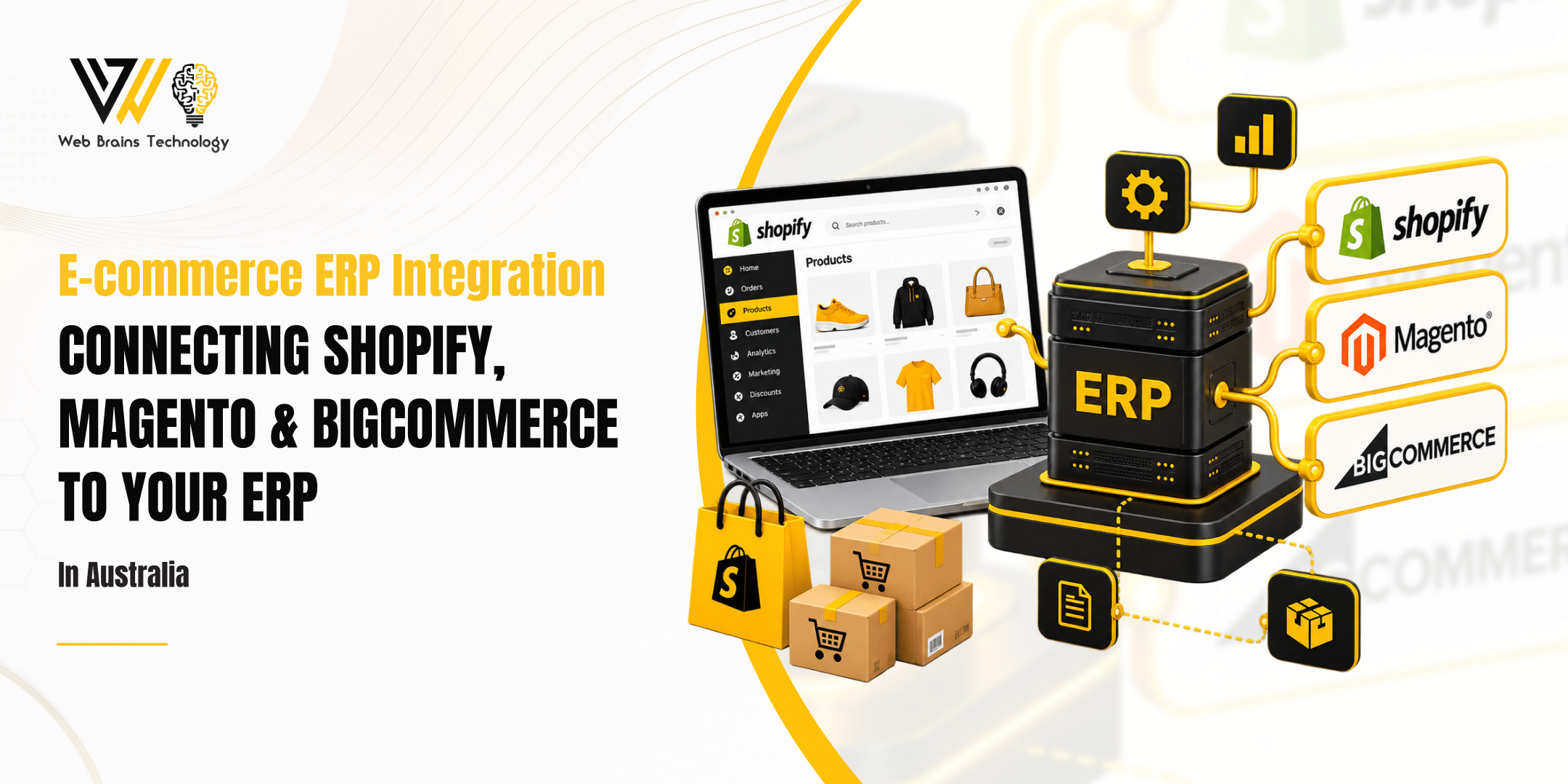
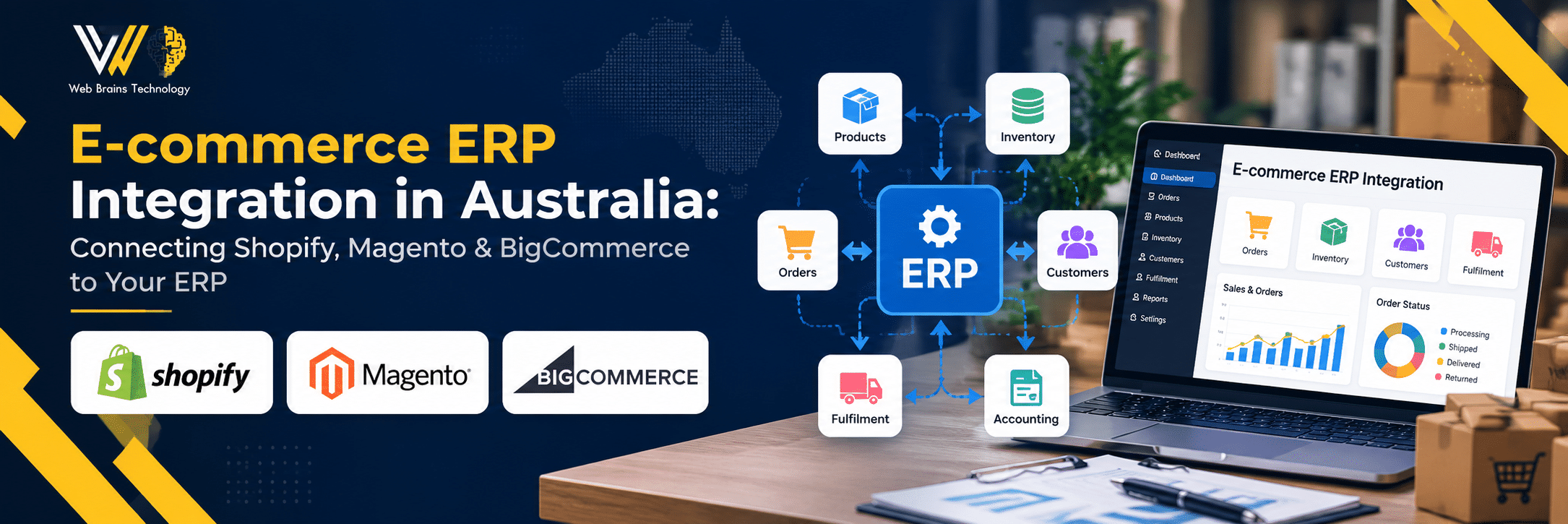
E-commerce ERP Integration in Australia: Connecting Shopify, Magento & BigCommerce to Your ERP

Australian e-commerce businesses often rely on multiple systems to manage online orders, inventory, customers, products, accounting and fulfilment. As an online store grows, manually transferring information between an e-commerce platform and an ERP system can create delays, duplicate data and unnecessary administrative work.

E-commerce ERP integration connects your online store with your ERP so important business data can move between systems more efficiently.

Whether your business operates on Shopify, Magento or BigCommerce, integration can help synchronise orders, inventory, product information, customer data and fulfilment processes while giving your team greater visibility across operations.

For Australian businesses managing increasing online sales, ERP integration can be an important step towards improving operational efficiency without replacing every system already in use.

What Is E-commerce ERP Integration?

E-commerce ERP integration is the process of connecting an e-commerce platform with an Enterprise Resource Planning (ERP) system.

Instead of maintaining separate information across your online store and back-office systems, an integration can allow relevant data to be exchanged between them.

Depending on the systems and integration architecture, this can include:

  • Customer information
  • Product data
  • Stock levels
  • Online orders
  • Order status
  • Pricing
  • Product variations
  • Shipping information
  • Tax information
  • Invoices
  • Returns and refunds
  • Fulfilment information

The exact data exchanged depends on the e-commerce platform, ERP, APIs, business processes and integration requirements.

E-commerce ERP integration in Australia

Why Australian E-commerce Businesses Need ERP Integration

As an e-commerce operation grows, managing data manually becomes increasingly difficult.

For example, an Australian retailer may receive an order through Shopify while inventory is managed in an ERP and fulfilment is handled through another system.

Without appropriate integration, employees may need to manually transfer information between platforms.

This can result in:

  • Duplicate data entry
  • Inventory discrepancies
  • Delayed order processing
  • Incorrect product information
  • Manual reconciliation
  • Limited visibility across departments
  • Increased operational workload
  • Higher risk of human error

An integrated environment can reduce unnecessary manual processes and provide a more consistent flow of information.

Shopify ERP Integration Australia

Shopify ERP integration connects a Shopify store with an ERP or other business systems.

For Australian Shopify businesses, integration may be useful when order volumes increase or when inventory, accounting and fulfilment become difficult to manage through disconnected systems.

Common Shopify ERP integration requirements include:

  • Shopify order synchronisation
  • Product and SKU synchronisation
  • Inventory updates
  • Customer data synchronisation
  • Pricing updates
  • Order fulfilment updates
  • Shipping information
  • Returns and refund data
  • Invoice information

For example, when a customer places an order through a Shopify store, the integration can transfer the relevant order information to the ERP for processing.

Australian businesses that require customised Shopify functionality can also work with experienced Shopify developers when their ERP integration involves custom workflows, API connections or tailored e-commerce functionality. 

Shopify ERP integration can help businesses:

  • Reduce manual order entry
  • Improve inventory visibility
  • Streamline fulfilment
  • Reduce duplicate data
  • Connect online sales with back-office operations

The integration should be designed around the actual business workflow rather than simply connecting every available data field.

Magento ERP Integration Australia

Magento, now part of Adobe Commerce, is commonly used for more complex e-commerce operations where businesses require extensive product, customer and commerce functionality.

Magento ERP integration can connect the store with an ERP to support the exchange of operational and commercial information.

Depending on requirements, an integration may synchronise:

  • Products
  • Product attributes
  • Categories
  • SKUs
  • Inventory
  • Customer accounts
  • Orders
  • Invoices
  • Shipping information
  • Returns
  • Pricing
  • Promotions

For businesses operating large product catalogues or multiple sales channels, keeping product and inventory information consistent can become particularly important.

A well-designed Magento ERP integration can help create a more connected workflow between the online storefront and internal business systems.

BigCommerce ERP Integration Australia

BigCommerce ERP integration connects a BigCommerce store with an ERP or other business applications.

This can be particularly useful for growing Australian businesses that need to coordinate online sales with inventory, fulfilment, accounting or warehouse operations.

Depending on the integration requirements, data may flow between BigCommerce and the ERP for:

  • Orders
  • Products
  • Inventory
  • Customers
  • Pricing
  • Shipping
  • Fulfilment
  • Returns
  • Invoices

The integration architecture should account for the frequency and direction of data synchronisation.

For example, inventory information may need to flow from the ERP to BigCommerce, while new customer orders may flow from BigCommerce into the ERP.

What Data Can Be Synced Between an E-commerce Store and ERP?

The data required for integration differs between businesses.

However, common integration areas include the following.

1. Product Data

Product information can include:

  • Product names
  • SKUs
  • Descriptions
  • Categories
  • Product variations
  • Pricing
  • Product attributes

Synchronising product information can reduce the need to update the same information manually in multiple systems.

2. Inventory

Inventory synchronisation is one of the most important requirements for many e-commerce businesses.

Stock levels can potentially be synchronised between the ERP and online store so customers see more accurate availability.

This becomes particularly important when products are sold through multiple channels.

3. Orders

Customer orders can be transferred from the e-commerce platform into the ERP for processing.

This may include:

  • Customer details
  • Products purchased
  • Quantities
  • Prices
  • Discounts
  • Shipping details
  • Payment information
  • Tax information

4. Customers

Customer information can potentially be synchronised between systems to reduce duplicate records and improve visibility.

5. Fulfilment and Shipping

Order status and fulfilment information can be transferred between systems so customers and internal teams have better visibility of order progress.

How Does E-commerce ERP Integration Work?

A typical integration can involve several components.

E-commerce Platform

This could be:

  • Shopify
  • Magento / Adobe Commerce
  • BigCommerce

Integration Layer

An integration layer can manage communication between the e-commerce platform and ERP.

This may use:

  • APIs
  • Middleware
  • Webhooks
  • Custom integration services
  • Scheduled synchronisation
  • Event-driven workflows

ERP System

The ERP acts as a central business system for relevant operational information such as inventory, orders, financial processes or supply chain data.

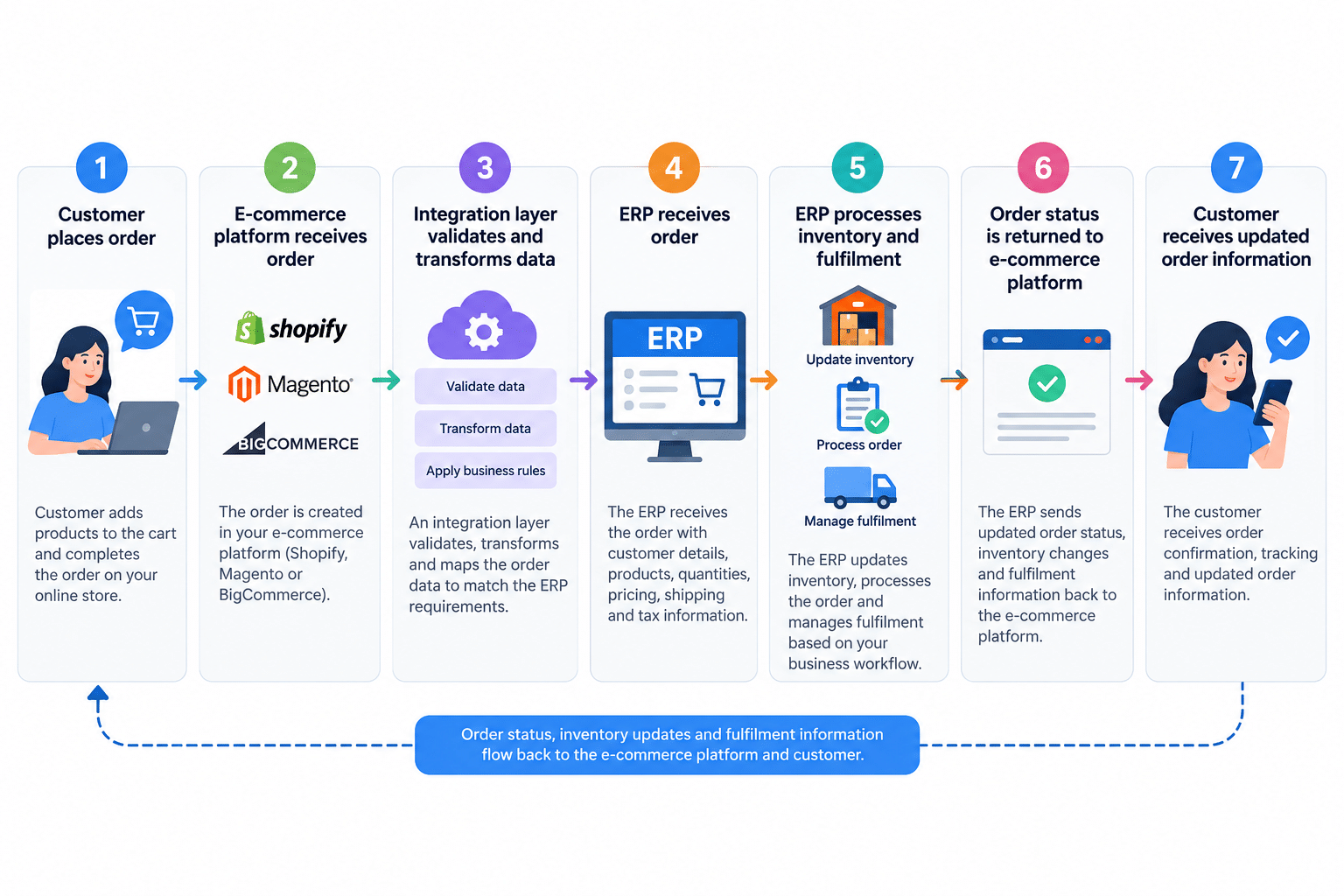
Example Data Flow

A simplified order workflow can show how information moves between an e-commerce platform, integration layer and ERP system. The exact data flow depends on the platforms, ERP and business requirements. 

E-commerce to ERP Integration Workflow

The actual architecture depends on the platforms, ERP and business requirements.

API-Based vs Middleware ERP Integration

There is no single integration architecture that works for every Australian e-commerce business.

Two common approaches are direct API integration and middleware-based integration.

Direct API Integration

A custom integration can connect the e-commerce platform directly with the ERP using APIs.

Potential advantages:

  • Greater control
  • Custom business logic
  • Flexible data mapping
  • Suitable for specialised workflows

Potential challenges:

  • Development and maintenance requirements
  • More responsibility for error handling
  • API changes may require updates

Middleware Integration

Middleware sits between the e-commerce platform and ERP.

It can help manage:

  • Data transformation
  • Routing
  • Authentication
  • Error handling
  • Synchronisation
  • Multiple system connections

Middleware can become particularly useful when a business needs to connect several systems rather than only an e-commerce platform and ERP.

Common E-commerce ERP Integration Challenges

ERP integration is not simply a matter of connecting two APIs.

Businesses need to understand how their systems currently store and process information.

Data Mapping

The same information may use different field names or structures across systems.

For example, an e-commerce platform may use one SKU structure while the ERP uses another.

Inventory Synchronisation

Businesses need to determine which system is the source of truth for inventory.

Duplicate Records

Customer and product records can become duplicated if matching rules are not properly defined.

API Limitations

Platforms and ERP systems may have API limits, authentication requirements or different synchronisation capabilities.

Error Handling

An integration should have a way to identify and manage failed transactions.

Legacy Systems

Older ERP systems may require additional integration methods or custom middleware.

Security

Customer and business data should be transferred using appropriate authentication and security practices.

How Much Does E-commerce ERP Integration Cost in Australia?

There is no fixed price for ERP integration because every business has different systems and requirements.

The cost can depend on:

  • E-commerce platform
  • ERP platform
  • Number of systems involved
  • Number of data entities
  • API availability
  • Integration complexity
  • Custom business rules
  • Number of sales channels
  • Inventory requirements
  • Data migration requirements
  • Testing requirements
  • Ongoing maintenance

A simple integration between two systems may require significantly less work than a multi-system architecture involving an ERP, e-commerce platform, warehouse management system, payment platform and shipping software.

For this reason, Australian businesses should assess the required workflows and integrations before comparing development costs.

E-commerce ERP Integration Process

A structured integration process can help reduce implementation risks.

Step 1: Understand Business Requirements

Identify the systems currently being used and the processes that need to be connected.

Step 2: Map Data

Determine what information needs to move between systems and which system should be the source of truth.

Step 3: Review APIs and Integration Options

Assess the available APIs, middleware options and technical limitations of each platform.

Step 4: Design the Integration Architecture

Define how information will move between Shopify, Magento or BigCommerce and the ERP.

Step 5: Develop the Integration

Build the required connections, data transformations, business rules and workflows.

Step 6: Test the Integration

Test normal transactions as well as failed orders, incorrect data, duplicate records and other edge cases.

Step 7: Deploy and Monitor

After deployment, monitor synchronisation and resolve integration errors.

Step 8: Ongoing Support

E-commerce platforms and ERP systems change over time, so integrations may require maintenance and optimisation.

How to Choose an ERP Integration Partner in Australia

Choosing an integration partner should involve more than comparing development prices.

Look for a provider that can understand both the e-commerce workflow and the back-office business process.

Consider:

Experience With Your Platforms

Ask whether the provider has experience integrating your e-commerce platform and ERP.

API and Integration Expertise

The team should understand APIs, authentication, data mapping, webhooks and integration architecture.

Business Process Understanding

The integration should support how your business actually operates.

Testing and Error Handling

Ask how failed synchronisations and data errors will be identified and managed.

Scalability

The integration should be able to support business growth where practical.

Ongoing Support

Find out how updates, API changes and future integration requirements will be handled

When Should an Australian Business Consider ERP Integration?

ERP integration may be worth considering when:

  • Order volume is increasing
  • Staff manually enter orders into multiple systems
  • Inventory information is frequently inconsistent
  • Multiple sales channels are being used
  • Product data is maintained in several systems
  • Fulfilment processes are becoming difficult to manage
  • Finance and e-commerce systems are disconnected
  • The business is expanding into new sales channels

However, integration is not automatically the right solution for every business.

Before development begins, evaluate the existing systems, processes and expected business outcomes.

Benefits of E-commerce ERP Integration

A well-planned integration can help Australian businesses create a more connected technology environment.

Potential benefits include:

Reduced manual work
Automate repetitive data-transfer processes.

Better inventory visibility
Synchronise relevant stock information between systems.

Faster order processing
Move order information between the store and ERP more efficiently.

Improved data consistency
Reduce duplicate updates across multiple platforms.

Greater operational visibility
Connect e-commerce activity with internal business processes.

Scalable workflows
Build processes that can support increasing transaction volumes.

Final Thoughts

E-commerce ERP integration in Australia can help businesses connect their online stores with the systems responsible for inventory, orders, customers, fulfilment and other operational processes.

Whether you use Shopify, Magento or BigCommerce, the right integration approach depends on your ERP, existing technology stack and business workflows.

Rather than integrating every possible data field, start by identifying the processes creating the most manual work or operational problems. From there, a structured integration strategy can connect the systems that matter most while providing a foundation for future growth.

If your Australian e-commerce business is struggling with disconnected systems, manual order processing or inconsistent inventory data, ERP integration may provide a practical path towards a more connected operation.

Frequently Asked Questions

What is e-commerce ERP integration?

E-commerce ERP integration connects an online store such as Shopify, Magento or BigCommerce with an ERP system so relevant business data can be exchanged between the systems.

Can Shopify integrate with an ERP?

Yes. Shopify can be integrated with ERP systems using APIs, middleware or other integration approaches depending on the ERP and business requirements.

Can Magento integrate with an ERP?

Yes. Magento / Adobe Commerce can be connected to ERP systems to synchronise information such as products, orders, customers and inventory.

Can BigCommerce integrate with an ERP?

Yes. BigCommerce can be integrated with ERP systems using APIs and other integration technologies, depending on the systems involved.

What information can be synchronised?

Depending on the integration, businesses may synchronise products, inventory, orders, customers, pricing, fulfilment, shipping and other operational information.

How much does ERP integration cost in Australia?

The cost depends on the platforms, number of systems, data requirements, integration complexity, custom workflows, testing and ongoing support requirements.

Do I need to replace my ERP to integrate with my e-commerce platform?

Not necessarily. If your existing ERP provides suitable integration capabilities, it may be possible to connect it with your e-commerce platform without replacing the ERP.

How long does e-commerce ERP integration take?

Implementation time varies depending on the number of systems, data flows, APIs, custom requirements and testing needed. A proper technical assessment should be completed before providing a project timeline.

Can I connect multiple e-commerce platforms to one ERP? 

Yes. Depending on the ERP and integration architecture, multiple e-commerce platforms can potentially connect to a single ERP. The integration needs to account for data mapping, inventory rules, order workflows and the source of truth for each system.