E-commerce ERP Integration in Australia: Connecting Shopify, Magento & BigCommerce to Your ERP

Australian e-commerce businesses often rely on multiple systems to manage online orders, inventory, customers, products, accounting and fulfilment. As an online store grows, manually transferring information between an e-commerce platform and an ERP system can create delays, duplicate data and unnecessary administrative work.

E-commerce ERP integration connects your online store with your ERP so important business data can move between systems more efficiently.

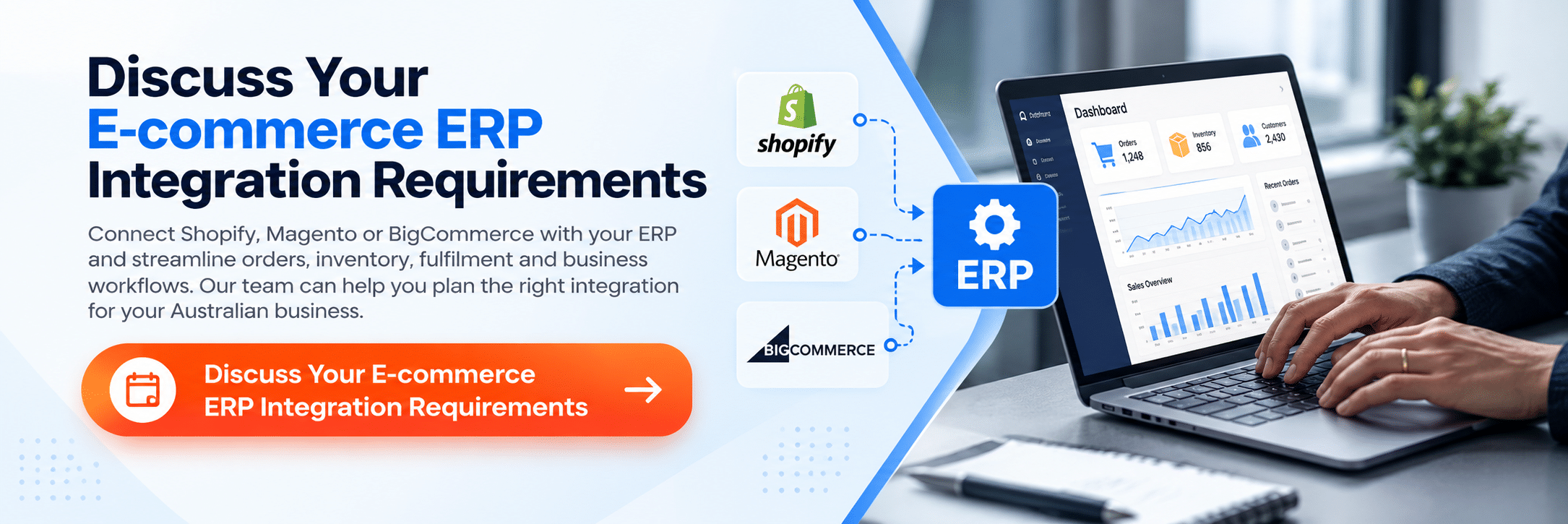
Whether your business operates on Shopify, Magento or BigCommerce, integration can help synchronise orders, inventory, product information, customer data and fulfilment processes while giving your team greater visibility across operations.

For Australian businesses managing increasing online sales, ERP integration can be an important step towards improving operational efficiency without replacing every system already in use.

What Is E-commerce ERP Integration?

E-commerce ERP integration is the process of connecting an e-commerce platform with an Enterprise Resource Planning (ERP) system.

Instead of maintaining separate information across your online store and back-office systems, an integration can allow relevant data to be exchanged between them.

Depending on the systems and integration architecture, this can include:

  • Customer information
  • Product data
  • Stock levels
  • Online orders
  • Order status
  • Pricing
  • Product variations
  • Shipping information
  • Tax information
  • Invoices
  • Returns and refunds
  • Fulfilment information

The exact data exchanged depends on the e-commerce platform, ERP, APIs, business processes and integration requirements.
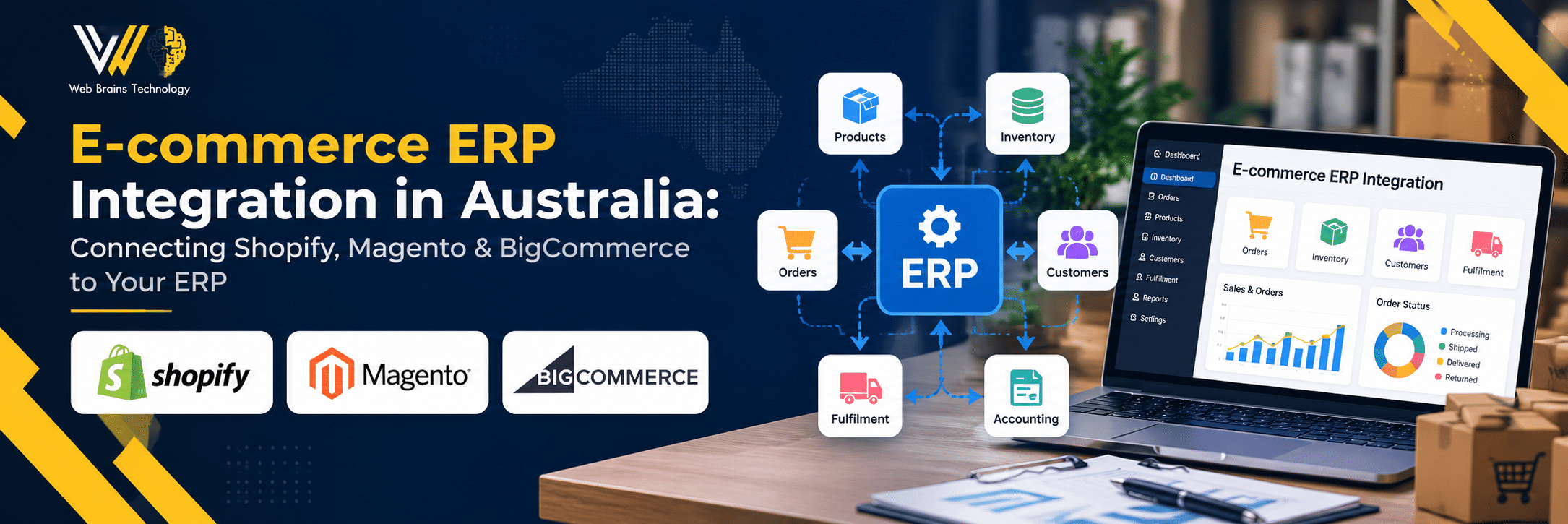
E-commerce ERP integration in Australia

Why Australian E-commerce Businesses Need ERP Integration

As an e-commerce operation grows, managing data manually becomes increasingly difficult.

For example, an Australian retailer may receive an order through Shopify while inventory is managed in an ERP and fulfilment is handled through another system.

Without appropriate integration, employees may need to manually transfer information between platforms.

This can result in:

  • Duplicate data entry
  • Inventory discrepancies
  • Delayed order processing
  • Incorrect product information
  • Manual reconciliation
  • Limited visibility across departments
  • Increased operational workload
  • Higher risk of human error

An integrated environment can reduce unnecessary manual processes and provide a more consistent flow of information.

Shopify ERP Integration Australia

Shopify ERP integration connects a Shopify store with an ERP or other business systems.

For Australian Shopify businesses, integration may be useful when order volumes increase or when inventory, accounting and fulfilment become difficult to manage through disconnected systems.

Common Shopify ERP integration requirements include:

  • Shopify order synchronisation
  • Product and SKU synchronisation
  • Inventory updates
  • Customer data synchronisation
  • Pricing updates
  • Order fulfilment updates
  • Shipping information
  • Returns and refund data
  • Invoice information

For example, when a customer places an order through a Shopify store, the integration can transfer the relevant order information to the ERP for processing.

Australian businesses that require customised Shopify functionality can also work with experienced Shopify developers when their ERP integration involves custom workflows, API connections or tailored e-commerce functionality. 

Shopify ERP integration can help businesses:

  • Reduce manual order entry
  • Improve inventory visibility
  • Streamline fulfilment
  • Reduce duplicate data
  • Connect online sales with back-office operations

The integration should be designed around the actual business workflow rather than simply connecting every available data field.

Magento ERP Integration Australia

Magento, now part of Adobe Commerce, is commonly used for more complex e-commerce operations where businesses require extensive product, customer and commerce functionality.

Magento ERP integration can connect the store with an ERP to support the exchange of operational and commercial information.

Depending on requirements, an integration may synchronise:

  • Products
  • Product attributes
  • Categories
  • SKUs
  • Inventory
  • Customer accounts
  • Orders
  • Invoices
  • Shipping information
  • Returns
  • Pricing
  • Promotions

For businesses operating large product catalogues or multiple sales channels, keeping product and inventory information consistent can become particularly important.

A well-designed Magento ERP integration can help create a more connected workflow between the online storefront and internal business systems.

BigCommerce ERP Integration Australia

BigCommerce ERP integration connects a BigCommerce store with an ERP or other business applications.

This can be particularly useful for growing Australian businesses that need to coordinate online sales with inventory, fulfilment, accounting or warehouse operations.

Depending on the integration requirements, data may flow between BigCommerce and the ERP for:

  • Orders
  • Products
  • Inventory
  • Customers
  • Pricing
  • Shipping
  • Fulfilment
  • Returns
  • Invoices

The integration architecture should account for the frequency and direction of data synchronisation.

For example, inventory information may need to flow from the ERP to BigCommerce, while new customer orders may flow from BigCommerce into the ERP.

What Data Can Be Synced Between an E-commerce Store and ERP?

The data required for integration differs between businesses.

However, common integration areas include the following.

1. Product Data

Product information can include:

  • Product names
  • SKUs
  • Descriptions
  • Categories
  • Product variations
  • Pricing
  • Product attributes

Synchronising product information can reduce the need to update the same information manually in multiple systems.

2. Inventory

Inventory synchronisation is one of the most important requirements for many e-commerce businesses.

Stock levels can potentially be synchronised between the ERP and online store so customers see more accurate availability.

This becomes particularly important when products are sold through multiple channels.

3. Orders

Customer orders can be transferred from the e-commerce platform into the ERP for processing.

This may include:

  • Customer details
  • Products purchased
  • Quantities
  • Prices
  • Discounts
  • Shipping details
  • Payment information
  • Tax information

4. Customers

Customer information can potentially be synchronised between systems to reduce duplicate records and improve visibility.

5. Fulfilment and Shipping

Order status and fulfilment information can be transferred between systems so customers and internal teams have better visibility of order progress.

How Does E-commerce ERP Integration Work?

A typical integration can involve several components.

E-commerce Platform

This could be:

  • Shopify
  • Magento / Adobe Commerce
  • BigCommerce

Integration Layer

An integration layer can manage communication between the e-commerce platform and ERP.

This may use:

  • APIs
  • Middleware
  • Webhooks
  • Custom integration services
  • Scheduled synchronisation
  • Event-driven workflows

ERP System

The ERP acts as a central business system for relevant operational information such as inventory, orders, financial processes or supply chain data.

Example Data Flow

A simplified order workflow can show how information moves between an e-commerce platform, integration layer and ERP system. The exact data flow depends on the platforms, ERP and business requirements. 
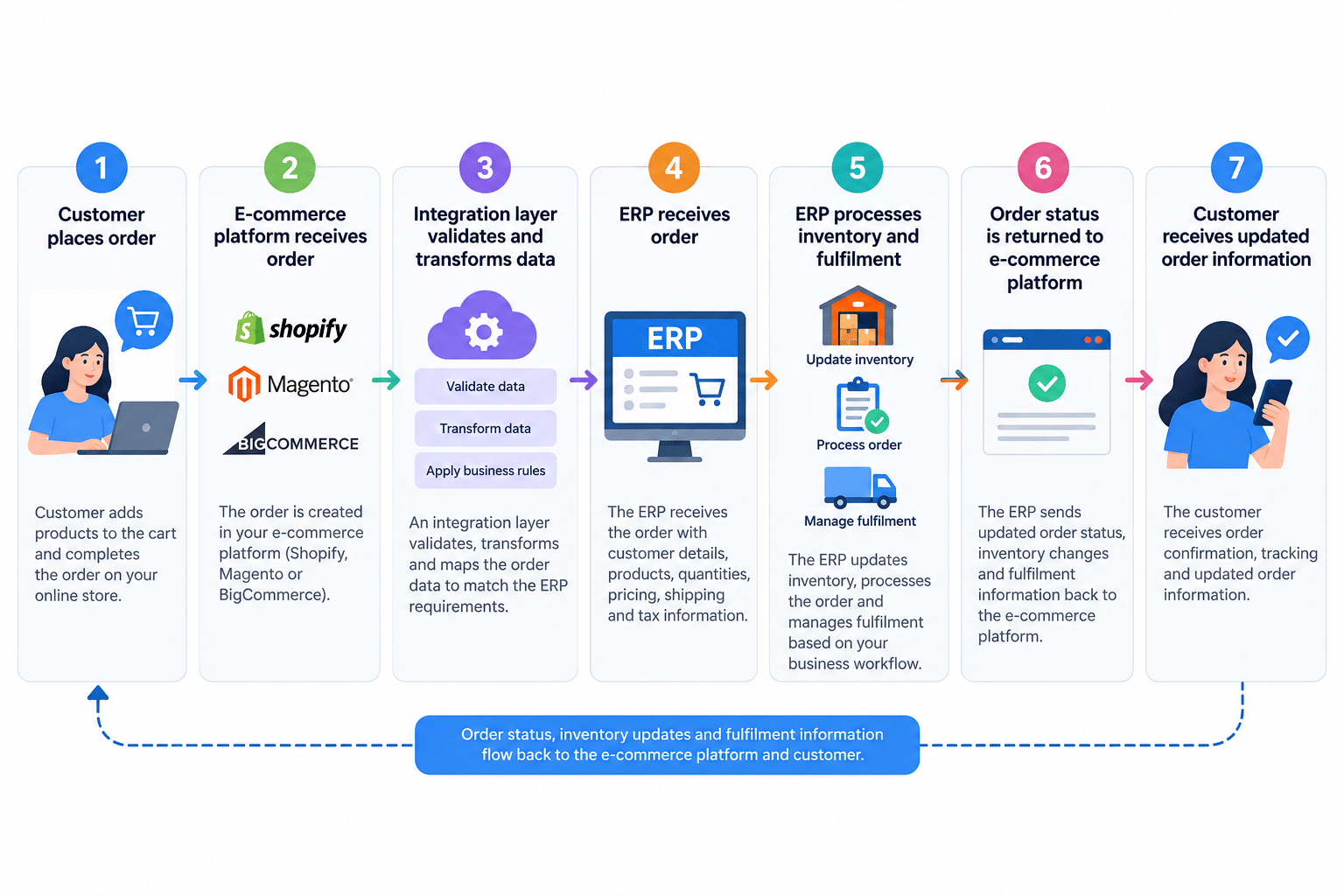
E-commerce to ERP Integration Workflow

The actual architecture depends on the platforms, ERP and business requirements.

API-Based vs Middleware ERP Integration

There is no single integration architecture that works for every Australian e-commerce business.

Two common approaches are direct API integration and middleware-based integration.

Direct API Integration

A custom integration can connect the e-commerce platform directly with the ERP using APIs.

Potential advantages:

  • Greater control
  • Custom business logic
  • Flexible data mapping
  • Suitable for specialised workflows

Potential challenges:

  • Development and maintenance requirements
  • More responsibility for error handling
  • API changes may require updates

Middleware Integration

Middleware sits between the e-commerce platform and ERP.

It can help manage:

  • Data transformation
  • Routing
  • Authentication
  • Error handling
  • Synchronisation
  • Multiple system connections

Middleware can become particularly useful when a business needs to connect several systems rather than only an e-commerce platform and ERP.

Common E-commerce ERP Integration Challenges

ERP integration is not simply a matter of connecting two APIs.

Businesses need to understand how their systems currently store and process information.

Data Mapping

The same information may use different field names or structures across systems.

For example, an e-commerce platform may use one SKU structure while the ERP uses another.

Inventory Synchronisation

Businesses need to determine which system is the source of truth for inventory.

Duplicate Records

Customer and product records can become duplicated if matching rules are not properly defined.

API Limitations

Platforms and ERP systems may have API limits, authentication requirements or different synchronisation capabilities.

Error Handling

An integration should have a way to identify and manage failed transactions.

Legacy Systems

Older ERP systems may require additional integration methods or custom middleware.

Security

Customer and business data should be transferred using appropriate authentication and security practices.

How Much Does E-commerce ERP Integration Cost in Australia?

There is no fixed price for ERP integration because every business has different systems and requirements.

The cost can depend on:

  • E-commerce platform
  • ERP platform
  • Number of systems involved
  • Number of data entities
  • API availability
  • Integration complexity
  • Custom business rules
  • Number of sales channels
  • Inventory requirements
  • Data migration requirements
  • Testing requirements
  • Ongoing maintenance

A simple integration between two systems may require significantly less work than a multi-system architecture involving an ERP, e-commerce platform, warehouse management system, payment platform and shipping software.

For this reason, Australian businesses should assess the required workflows and integrations before comparing development costs.

E-commerce ERP Integration Process

A structured integration process can help reduce implementation risks.

Step 1: Understand Business Requirements

Identify the systems currently being used and the processes that need to be connected.

Step 2: Map Data

Determine what information needs to move between systems and which system should be the source of truth.

Step 3: Review APIs and Integration Options

Assess the available APIs, middleware options and technical limitations of each platform.

Step 4: Design the Integration Architecture

Define how information will move between Shopify, Magento or BigCommerce and the ERP.

Step 5: Develop the Integration

Build the required connections, data transformations, business rules and workflows.

Step 6: Test the Integration

Test normal transactions as well as failed orders, incorrect data, duplicate records and other edge cases.

Step 7: Deploy and Monitor

After deployment, monitor synchronisation and resolve integration errors.

Step 8: Ongoing Support

E-commerce platforms and ERP systems change over time, so integrations may require maintenance and optimisation.

How to Choose an ERP Integration Partner in Australia

Choosing an integration partner should involve more than comparing development prices.

Look for a provider that can understand both the e-commerce workflow and the back-office business process.

Consider:

Experience With Your Platforms

Ask whether the provider has experience integrating your e-commerce platform and ERP.

API and Integration Expertise

The team should understand APIs, authentication, data mapping, webhooks and integration architecture.

Business Process Understanding

The integration should support how your business actually operates.

Testing and Error Handling

Ask how failed synchronisations and data errors will be identified and managed.

Scalability

The integration should be able to support business growth where practical.

Ongoing Support

Find out how updates, API changes and future integration requirements will be handled

When Should an Australian Business Consider ERP Integration?

ERP integration may be worth considering when:

  • Order volume is increasing
  • Staff manually enter orders into multiple systems
  • Inventory information is frequently inconsistent
  • Multiple sales channels are being used
  • Product data is maintained in several systems
  • Fulfilment processes are becoming difficult to manage
  • Finance and e-commerce systems are disconnected
  • The business is expanding into new sales channels

However, integration is not automatically the right solution for every business.

Before development begins, evaluate the existing systems, processes and expected business outcomes.

Benefits of E-commerce ERP Integration

A well-planned integration can help Australian businesses create a more connected technology environment.

Potential benefits include:

Reduced manual work
Automate repetitive data-transfer processes.

Better inventory visibility
Synchronise relevant stock information between systems.

Faster order processing
Move order information between the store and ERP more efficiently.

Improved data consistency
Reduce duplicate updates across multiple platforms.

Greater operational visibility
Connect e-commerce activity with internal business processes.

Scalable workflows
Build processes that can support increasing transaction volumes.

Final Thoughts

E-commerce ERP integration in Australia can help businesses connect their online stores with the systems responsible for inventory, orders, customers, fulfilment and other operational processes.

Whether you use Shopify, Magento or BigCommerce, the right integration approach depends on your ERP, existing technology stack and business workflows.

Rather than integrating every possible data field, start by identifying the processes creating the most manual work or operational problems. From there, a structured integration strategy can connect the systems that matter most while providing a foundation for future growth.

If your Australian e-commerce business is struggling with disconnected systems, manual order processing or inconsistent inventory data, ERP integration may provide a practical path towards a more connected operation.

Frequently Asked Questions

What is e-commerce ERP integration?

E-commerce ERP integration connects an online store such as Shopify, Magento or BigCommerce with an ERP system so relevant business data can be exchanged between the systems.

Can Shopify integrate with an ERP?

Yes. Shopify can be integrated with ERP systems using APIs, middleware or other integration approaches depending on the ERP and business requirements.

Can Magento integrate with an ERP?

Yes. Magento / Adobe Commerce can be connected to ERP systems to synchronise information such as products, orders, customers and inventory.

Can BigCommerce integrate with an ERP?

Yes. BigCommerce can be integrated with ERP systems using APIs and other integration technologies, depending on the systems involved.

What information can be synchronised?

Depending on the integration, businesses may synchronise products, inventory, orders, customers, pricing, fulfilment, shipping and other operational information.

How much does ERP integration cost in Australia?

The cost depends on the platforms, number of systems, data requirements, integration complexity, custom workflows, testing and ongoing support requirements.

Do I need to replace my ERP to integrate with my e-commerce platform?

Not necessarily. If your existing ERP provides suitable integration capabilities, it may be possible to connect it with your e-commerce platform without replacing the ERP.

How long does e-commerce ERP integration take?

Implementation time varies depending on the number of systems, data flows, APIs, custom requirements and testing needed. A proper technical assessment should be completed before providing a project timeline.

Can I connect multiple e-commerce platforms to one ERP? 

Yes. Depending on the ERP and integration architecture, multiple e-commerce platforms can potentially connect to a single ERP. The integration needs to account for data mapping, inventory rules, order workflows and the source of truth for each system.

10 Factors to Consider When Choosing a Web Development Company in Australia

Choosing the right Web Development Company In Australia is an important decision for any business planning a new website, redesign, eCommerce platform or custom web application. The development partner you select can influence your website’s performance, security, scalability, user experience and long-term maintenance.

With Australian web development companies offering different technologies, pricing models and levels of expertise, comparing providers based only on price or portfolio design can make the decision difficult.

A better approach is to evaluate each company against practical factors such as technical expertise, relevant experience, development process, communication, SEO, security, pricing and post-launch support.

The 10 key factors to consider when choosing a web development company in Australia are relevant experience, technical expertise, portfolio quality, development process, SEO and performance, security, scalability, communication, pricing and post-launch support. 

1. Relevant Web Development Experience

Start by looking at the company’s experience with projects similar to yours.

A company may have extensive web development experience, but that does not necessarily mean it has worked with the requirements of your business or industry.

Consider whether the development company has experience with:

  • Business websites
  • eCommerce websites
  • Custom web applications
  • WordPress development
  • WooCommerce development
  • Shopify development
  • API integrations
  • CRM and third-party integrations
  • Enterprise web applications
  • Website migrations and redesigns

Ask potential providers for examples of projects with similar functionality, technology or business requirements.

Relevant experience can help a development team understand common technical challenges before development begins.

2. Technical Expertise and Technology Stack

The technology used to build your website should match your business requirements rather than simply following the latest trend.

Depending on the project, you may need technologies and platforms such as:

  • WordPress
  • WooCommerce
  • Shopify
  • PHP
  • Laravel
  • React
  • Node.js
  • APIs
  • Cloud platforms
  • Custom databases

A professional web development company should be able to explain why a particular technology stack is suitable for your project.

For example, a small business website may have very different requirements from an enterprise platform that needs multiple integrations, user accounts and complex business workflows.

Before signing a contract, ask:

Which technologies will you use, and why are they suitable for my website?

The answer should relate to your requirements, scalability, performance, security and future maintenance.

3. Portfolio and Relevant Case Studies

A portfolio can provide useful evidence of a company’s development capabilities.

However, don’t evaluate a portfolio only by looking at how attractive the websites appear.

Look at the underlying project requirements.

Check whether previous websites demonstrate:

  • Responsive design
  • Good navigation
  • Fast loading
  • Mobile usability
  • Custom functionality
  • eCommerce features
  • Third-party integrations
  • Clear calls to action
  • Search-friendly website structures

If possible, review live websites from the company’s portfolio on both desktop and mobile devices.

Case studies can also help you understand the problem the developer solved, the technology used and the development approach.

4. Development Process and Project Management

A structured development process can make a complex website project easier to manage.

Before choosing a company, ask how the project will move from the initial requirement through to launch.

A typical web development process may include:

Requirement Gathering → Planning → UI/UX Design → Development → Testing → Deployment → Post-Launch Support

Ask the company:

  • How are project requirements documented?
  • Who manages the project?
  • How often will progress be reported?
  • How will you provide feedback?
  • How are revisions handled?
  • How are additional requirements managed?
  • What happens if the project timeline changes?

A clear process helps both the business and development team understand responsibilities, milestones and deliverables.

5. Website SEO, Performance and Mobile Responsiveness

Web development and SEO should not be treated as completely separate activities.

The technical structure created during development can affect how search engines crawl, understand and access your website.

When evaluating a web development company, ask whether the development process considers:

  • Mobile responsiveness
  • Website speed
  • Core Web Vitals
  • Metadata implementation
  • Image optimisation
  • Internal linking
  • Structured data where appropriate
  • XML sitemaps
  • Crawlability
  • Indexability
  • Redirect management

The website should also provide a consistent experience across smartphones, tablets and desktop devices.

For Australian businesses competing in organic search, building a technically sound website from the beginning can reduce the need for major SEO-related redevelopment later.

6. Website Security and Data Protection

Security should be considered during development rather than only after a website has been launched.

Depending on the type of website, security requirements can include:

  • SSL/HTTPS
  • Secure authentication
  • Regular software updates
  • Secure API integrations
  • Access control
  • Protection against common web vulnerabilities
  • Secure payment processing
  • Database security
  • Regular backups

If your website collects customer information, processes payments or connects with business systems, discuss security requirements before development starts.

Ask the development company how it handles security testing, updates, backups and access permissions.

7. Scalability and Future Development

Your website may need to grow as your business grows.

A website that works for a small number of products, customers or users today may require additional functionality in the future.

Before choosing a development company, consider whether the proposed solution can accommodate:

  • Additional products or services
  • More website traffic
  • New integrations
  • Additional users
  • New payment methods
  • CRM integrations
  • Marketing automation
  • Mobile applications
  • New business workflows

Ask:

Can this website architecture support our expected growth over the next few years?

A development partner should be able to explain the scalability considerations of the proposed solution.

8. Communication and Support

Good communication is an important part of managing a web development project.

Before starting, establish how you will communicate with the development team and how frequently you will receive updates.

Ask about:

  • Project management tools
  • Email and messaging channels
  • Scheduled meetings
  • Development updates
  • Response times
  • Issue escalation
  • Technical support
  • Post-launch communication

For Australian businesses working with development teams in different locations, also consider time-zone compatibility and availability during Australian business hours.

Clear communication can help reduce misunderstandings about requirements, deadlines and project changes.

9. Pricing, Scope and Contract Terms

Price is an important consideration, but the cheapest proposal may not provide the same scope or level of service as a higher-priced proposal.

Instead of comparing only the final price, compare what each proposal includes.

Look for details such as:

AreaWhat to Check
DesignCustom design or template-based design?
DevelopmentWhich functionality is included?
IntegrationsAre APIs, CRM or third-party systems included?
TestingWhat testing is performed before launch?
HostingIs hosting included or separate?
SEOWhat technical SEO work is included?
ContentWho provides and uploads content?
RevisionsHow many revision rounds are included?
SupportWhat support is provided after launch?
OwnershipWho owns the website, code and assets?

Also clarify whether the project is fixed-price, milestone-based or charged hourly.

A detailed proposal makes it easier to compare development companies on scope rather than price alone.

10. Post-Launch Maintenance and Support

Website development does not necessarily end when the website goes live.

Websites may require ongoing maintenance, security updates, performance improvements, bug fixes and new functionality.

Ask potential development partners what happens after launch.

Post-launch services may include:

  • Website maintenance
  • Security updates
  • Bug fixes
  • Performance optimisation
  • Backup management
  • Software updates
  • Technical support
  • Feature enhancements
  • Third-party integration support
  • Ongoing development

Understanding the available support before signing the development agreement can help you plan for the long-term cost of managing your website.

Questions to Ask a Web Development Company Before Hiring

Before selecting a development partner, consider asking:

  1. Have you developed websites similar to ours?
  2. Which technology stack do you recommend for our project?
  3. Can we review relevant case studies or live websites?
  4. What is included in the development scope?
  5. How long is the expected development timeline?
  6. Who will work on our project?
  7. How will project communication and updates work?
  8. How do you approach website security?
  9. How do you consider SEO and website performance during development?
  10. Who owns the website source code and assets?
  11. What happens if we need additional functionality?
  12. What support is available after launch?

The answers can help you compare different providers more consistently.

Web Development Company vs Freelancer: Which Should You Choose?

The right option depends on your project’s complexity, technical requirements, budget and expected level of ongoing support. Businesses should compare these factors alongside the developer’s experience, communication process and ability to support the project over time. 

Consider:

RequirementFreelancerWeb Development Company
Small websiteMay be suitableMay be suitable
Complex integrationsDepends on expertiseOften involves multiple specialists
Large development teamLimitedTypically available
Long-term developmentDepends on availabilityCan provide ongoing resources
Project managementMay be handled by developerOften dedicated project management
Enterprise requirementsDepends on capabilityCan support larger team structures

The decision should be based on project complexity, technical requirements, budget and the level of ongoing support required.

How Much Does Web Development Cost in Australia?

The cost of developing a website in Australia can vary significantly depending on the project’s requirements.

Factors that can influence development costs include:

  • Website size
  • Design complexity
  • Number of pages
  • Custom functionality
  • eCommerce requirements
  • API integrations
  • CRM integrations
  • Payment gateways
  • User accounts
  • Content management requirements
  • Testing requirements
  • Ongoing maintenance

Rather than asking only How much does a website cost?, ask for a detailed proposal that explains the scope, deliverables, development timeline and ongoing costs.

This makes it easier to understand what you are actually paying for.

Red Flags to Watch For When Choosing a Web Development Company

Before signing an agreement, watch for potential warning signs such as:

  • No relevant portfolio or case studies
  • Unclear project scope
  • Extremely vague pricing
  • No defined development process
  • No testing process
  • Unclear ownership of the website or source code
  • No post-launch support options
  • Unrealistic delivery promises
  • Poor communication
  • Limited explanation of the recommended technology

These issues do not automatically mean a company is unsuitable, but they are reasons to ask additional questions before committing to a project.

Web Development Checklist for Australian Businesses

Use this checklist when comparing web development companies:

  • Relevant development experience
  • Suitable technology expertise
  • Strong portfolio and case studies
  • Clear development process
  • Mobile-responsive development
  • SEO-friendly technical foundation
  • Website security considerations
  • Scalable architecture
  • Clear communication process
  • Transparent project scope and pricing
  • Clear ownership terms
  • Post-launch support

A provider that can clearly address these areas gives you more information to evaluate before making your decision.

Web Development Support for Australian Businesses 

Webbrains helps businesses develop websites and custom digital solutions based on their specific requirements.

Our capabilities include custom web development, eCommerce development, front-end development, back-end development, API development and full-stack development.

We begin by understanding the project’s business and technical requirements before recommending an appropriate development approach. This helps businesses identify the right technology, functionality and development process for their website or web application.

If you’re planning a new website, redesign or custom web application, explore our web development services to learn more about our approach, development capabilities and available solutions for Australian businesses. 

Final Thoughts

Choosing a web development company in Australia requires more than comparing website designs or selecting the lowest quote.

Look at the company’s relevant experience, technical capabilities, portfolio, development process, SEO and performance approach, security practices, communication, pricing structure, scalability and post-launch support.

Most importantly, make sure

the company understands your business requirements and can explain how its proposed solution will support your current needs and future growth.

By comparing these factors before signing a contract, Australian businesses can make a more informed decision and establish clearer expectations for the development project.

Frequently Asked Questions


How do I choose a web development company in Australia?

Start by defining your website requirements, then compare companies based on relevant experience, technical expertise, portfolio, development process, pricing, communication, security and post-launch support.

How much does web development cost in Australia?

Web development costs vary depending on the website’s size, functionality, technology, integrations, design requirements and ongoing support. Request a detailed proposal rather than comparing only headline prices.

What should I ask a web development company before hiring?

Ask about relevant projects, technology recommendations, project scope, timeline, development process, SEO, security, ownership, communication, pricing and post-launch support.

Should I choose a freelancer or a web development company?

The appropriate option depends on your project’s complexity, technical requirements, budget and need for ongoing support. Smaller projects may have different requirements from complex websites or custom applications.

Why is SEO important during web development?

SEO considerations such as mobile responsiveness, website performance, crawlability, URL structure and technical implementation can be incorporated during development, helping create a stronger technical foundation for future organic search activity.

What should be included in a web development proposal?

A proposal should clearly explain the project scope, deliverables, technology, timeline, pricing, integrations, testing, ownership terms, revisions and post-launch support.

Hire Shopify Expert Developers in Australia Without Costly Ecommerce Mistakes

Choosing the right Shopify developer can have a major impact on the success of your e-commerce business. A developer may be responsible for your store’s design implementation, custom functionality, integrations, performance, security and ongoing improvements.

For Australian businesses, hiring the cheapest developer is not always the most cost-effective option. Poor development decisions can lead to slow page speeds, broken integrations, difficult-to-manage code, unexpected costs and a Shopify store that fails to convert visitors into customers.

If you’re planning to Hire Shopify developers in Australia, the goal should not simply be to find someone who can build a Shopify store. You need a development partner who understands your business objectives, e-commerce requirements and Australian customer expectations.

This guide explains what to look for when hiring Shopify expert developers, the common mistakes to avoid and how to evaluate a developer before starting your project.

Why Australian Businesses Need Experienced Shopify Developers

Shopify makes it possible to launch an e-commerce store without extensive technical knowledge. However, building a store that can support long-term growth often requires considerably more than selecting a theme and uploading products.

An experienced Shopify developer can help Australian businesses with:

  • Shopify store development and customisation
  • Shopify theme development
  • Custom Shopify functionality
  • Third-party app integrations
  • Payment and shipping integrations
  • Product and inventory functionality
  • Shopify API integrations
  • Store performance optimisation
  • Mobile e-commerce optimisation
  • Conversion-focused development
  • Shopify migrations
  • Ongoing technical support

The right developer should also understand that your website is not simply a digital storefront. It is an important part of your sales, marketing and customer experience.

Hiring Shopify developers

Hiring the wrong developer can create technical and financial problems that are difficult to fix later.

Here are seven mistakes Australian businesses should avoid.

1. Choosing a Developer Based Only on Price

Price is important, but it should not be the only factor you consider.

A very low quote may appear attractive initially, but problems can arise if the developer has limited Shopify experience, underestimates the project or uses shortcuts that create technical issues later.

Instead of asking only:

How much does a Shopify developer cost?

Ask:

What value and technical capability will I receive for the investment?

Compare developers based on experience, previous Shopify projects, technical capability, communication, project scope and ongoing support.

2. Hiring Someone Without Checking Their Shopify Portfolio

A developer may claim to be experienced with Shopify, but you should verify their previous work.

Ask to see relevant examples of:

  • Shopify stores they have developed
  • Custom Shopify features
  • Theme customisations
  • API integrations
  • Ecommerce migrations
  • Complex product functionality
  • Mobile optimisation
  • Performance improvements

Look beyond screenshots.

A professional portfolio should help you understand what the developer actually contributed to the project and whether they have experience with requirements similar to yours.

3. Failing to Define the Project Scope

One of the easiest ways for an e-commerce project to exceed its budget is to start development without a clearly defined scope.

Before hiring a developer, document:

  • Required pages
  • Store functionality
  • Product requirements
  • Design requirements
  • Integrations
  • Payment requirements
  • Shipping requirements
  • Analytics and tracking
  • SEO requirements
  • Migration requirements
  • Testing requirements
  • Launch requirements
  • Ongoing support

A clear scope gives both your business and the developer a common understanding of what needs to be delivered.

4. Ignoring Shopify Integrations

Modern e-commerce stores often rely on multiple systems.

Your Shopify store may need to connect with:

  • Payment providers
  • Shipping platforms
  • Inventory systems
  • Accounting software
  • CRM platforms
  • Email marketing platforms
  • Analytics tools
  • Advertising platforms
  • Customer support systems
  • ERP or business management software

For an Australian e-commerce business, integration requirements should be discussed before development begins.

Your developer should be able to explain how each integration will work, what data will be exchanged and whether custom development is required.

5. Forgetting About Mobile Performance

Australian shoppers increasingly expect e-commerce websites to work smoothly on mobile devices.

A Shopify store may look impressive on a desktop but provide a poor experience on smaller screens.

Your developer should test:

  • Navigation
  • Product pages
  • Product images
  • Search
  • Cart functionality
  • Checkout journey
  • Forms
  • Buttons
  • Page loading
  • Responsive layouts

Mobile optimisation should be considered throughout development rather than added as an afterthought.

6. Not Discussing SEO Before Development

SEO should not begin after your Shopify store is launched.

Your developer and SEO team should consider technical SEO during the build.

Important areas include:

  • Site structure
  • URL structure
  • Redirects
  • Canonicalisation
  • Metadata
  • Heading structure
  • Image optimisation
  • Internal linking
  • XML sitemap
  • Robots directives
  • Structured data
  • Page speed
  • Mobile usability

If you’re migrating an existing e-commerce website to Shopify, URL mapping and redirects become particularly important.

A developer should understand how technical changes can affect your existing organic visibility.

7. Not Clarifying Ownership and Ongoing Support

Before signing an agreement, make sure you understand what happens after launch.

Ask:

  • Who owns the website?
  • Who owns the custom code?
  • Who manages the Shopify account?
  • Who manages third-party integrations?
  • What happens if an app stops working?
  • Is ongoing technical support available?
  • How are future changes charged?
  • What happens if you decide to change development partners?

These questions can prevent significant problems later.

What Should You Look for in a Shopify Expert Developer?

The right Shopify developer should combine technical skills with a practical understanding of e-commerce.

Shopify Development Experience

Look for demonstrated experience with Shopify rather than general web development experience alone.

Depending on your project, this may include:

  • Shopify theme development
  • Liquid
  • Shopify APIs
  • Custom functionality
  • Shopify app integrations
  • Store migrations
  • Performance optimisation
  • Ecommerce development

Ecommerce Understanding

A developer should understand how technical decisions affect the customer journey.

For example, a technically functional product page may still perform poorly if customers cannot quickly find product information, select variants or understand shipping options.

Your developer should think about both functionality and usability.

Integration Experience

If your store requires multiple systems, integration experience is essential.

Ask prospective developers about previous projects involving APIs, third-party platforms and business systems similar to yours.

Performance Knowledge

A Shopify developer should understand how themes, apps, scripts, images and custom functionality can affect store performance.

Ask how they plan to identify and reduce unnecessary performance issues before launch.

Communication

Technical knowledge is only part of a successful project.

Your developer should be able to explain technical decisions in straightforward language and provide clear information about:

  • Project progress
  • Development timelines
  • Problems
  • Changes
  • Costs
  • Testing
  • Launch requirements

Clear communication can prevent many development problems before they become expensive.

Shopify Freelancer vs Shopify Development Company

Australian businesses often need to decide whether to hire an individual freelancer or a Shopify development company.

FactorShopify FreelancerShopify Development Company
Team sizeUsually one developerMultiple specialists
Small tasksOften suitableSuitable
Complex projectsDepends on expertiseOften better suited
Design + developmentMay require separate resourcesCan often be handled by one team
IntegrationsDepends on experienceBroader technical resources
Ongoing supportDepends on availabilityUsually structured support options
ScalabilityDepends on individual capacityEasier to scale resources
Project managementMay be informalUsually structured

Neither option is automatically better.

The right choice depends on the complexity of your Shopify project, budget, timeline and ongoing requirements.

For a small theme adjustment, an experienced freelancer may be perfectly suitable.

For a complex e-commerce build involving custom functionality, integrations and ongoing development, a specialised Shopify development team may provide greater depth and continuity.

Questions to Ask Before Hiring Shopify Developers in Australia

Before signing a contract, ask potential developers these questions:

1. How many Shopify projects have you completed?

Look for relevant experience rather than simply a large number of projects.

2. Can you show Shopify stores similar to my business?

Industry and functionality experience can make the development process more efficient.

3. Can you explain your development process?

A professional team should be able to explain discovery, planning, development, testing and launch.

4. How will you handle third-party integrations?

Ask specifically about the systems your business needs to connect.

5. How will you approach mobile performance?

The answer should go beyond simply saying the website will be responsive.

6. What happens after launch?

Understand whether the developer provides maintenance, bug fixes and ongoing development.

7. What is included in the quoted price?

Make sure you understand exactly what is included and what may result in additional charges.

8. Who owns the final website and custom development?

Clarify ownership before development starts.

How Much Does It Cost to Hire Shopify Developers in Australia?

There is no single price for Shopify development because project requirements vary considerably.

The cost can depend on:

  • Store size
  • Number of products
  • Design requirements
  • Theme customisation
  • Custom functionality
  • Integrations
  • Migration requirements
  • App configuration
  • API development
  • Testing
  • SEO requirements
  • Ongoing support

A simple Shopify setup will require a different investment from a complex e-commerce platform involving custom development and multiple integrations.

Rather than selecting a developer purely on the lowest quote, compare scope, experience, deliverables, timeline and long-term value.

A detailed project proposal should clearly explain what you are paying for.

What Should a Shopify Development Proposal Include?

Before starting your project, request a written proposal or statement of work.

It should clearly explain:

  • Project objectives
  • Development scope
  • Deliverables
  • Required integrations
  • Design responsibilities
  • Development milestones
  • Testing process
  • Launch process
  • Project timeline
  • Payment schedule
  • Revision process
  • Support arrangements
  • Additional development costs
  • Ownership and access

This makes it easier to compare different Shopify developers and reduces the risk of unexpected costs.

A Practical Shopify Developer Hiring Checklist

Before choosing a developer, use this checklist:

Experience

  • Do they have proven Shopify experience?
  • Have they completed similar e-commerce projects?
  • Can they provide relevant examples?

Technical skills

  • Do they understand Shopify development?
  • Can they handle custom functionality?
  • Do they have integration experience?
  • Can they troubleshoot technical issues?

SEO and performance

  • Do they understand technical SEO?
  • Do they consider mobile performance?
  • Can they optimise Shopify themes and assets?

Project management

  • Is the scope clearly documented?
  • Are milestones defined?
  • Are responsibilities clear?
  • Is there a communication process?

Commercial terms

  • Is pricing transparent?
  • Are additional costs explained?
  • Is ownership clearly defined?
  • Is post-launch support available?

If a developer cannot provide clear answers to these questions, investigate further before committing your budget.

Why Australian Businesses Choose Experienced Shopify Developers

For an Australian e-commerce business, the objective should be more than launching another online store.

Your Shopify website needs to provide a reliable shopping experience while giving your business the technical foundation to grow.

An experienced Shopify development team can help you build and improve:

  • Custom e-commerce functionality
  • Conversion-focused shopping experiences
  • Mobile-friendly storefronts
  • Third-party integrations
  • Scalable Shopify solutions
  • Technical SEO foundations
  • Store performance
  • Ongoing e-commerce functionality

The right development partner should understand your commercial objectives as well as your technical requirements.

Build Your Shopify Store With the Right Development Partner

Hiring Shopify developers is an important investment for any Australian e-commerce business.

The cheapest quote may not deliver the best long-term value, and the most expensive developer is not automatically the right choice either.

The better approach is to evaluate Shopify experience, technical expertise, ecommerce understanding, communication, project scope, integrations, performance and ongoing support before making a decision.

If you’re planning to hire Shopify developers in Australia, Webbrain Technologies can help you plan, develop and improve a Shopify e-commerce solution around your business requirements.

Whether you need Shopify store development, custom functionality, integrations, migration or ongoing development support, speak with our team about your project requirements.

Planning to hire Shopify developers in Australia? Talk to Webbrain Technologies about your store requirements, custom functionality, integrations and ongoing development needs.

Frequently Asked Questions

How do I choose the right Shopify developer in Australia?

Look for proven Shopify experience, relevant ecommerce projects, technical expertise, integration capabilities, clear communication, transparent pricing and ongoing support. Always review previous work before making your decision.

How much does it cost to hire a Shopify developer in Australia?

The cost varies according to project complexity, functionality, integrations, design requirements and ongoing support. Request a detailed proposal rather than comparing developers only by hourly rates.

Should I hire a Shopify freelancer or development company?

A freelancer can be suitable for smaller or clearly defined tasks. A Shopify development company may be more appropriate for complex stores requiring multiple technical skills, integrations and ongoing development.

What should I ask a Shopify developer before hiring them?

Ask about their Shopify experience, previous projects, development process, integrations, performance approach, SEO considerations, pricing, ownership and post-launch support.

Can Shopify developers customise an existing Shopify theme?

Yes. Experienced Shopify developers can customise existing themes and develop additional functionality depending on the requirements of your store.

Can Shopify developers integrate other business systems?

Yes. Shopify can be connected with various third-party systems using apps, APIs and custom integrations. The appropriate approach depends on the systems and data your business needs to connect.

Why should Australian businesses hire Shopify developers?

An experienced developer can help Australian businesses create a more reliable, scalable and customised e-commerce store while reducing technical problems and avoiding costly development mistakes.

Is Shopify suitable for Australian e-commerce businesses?

Shopify can be suitable for businesses ranging from startups to established e-commerce retailers. The right setup depends on the business model, product catalogue, integrations, operational requirements and growth plans.

Final Takeaway

The right Shopify developer should do more than make your e-commerce website look good.

They should help you create a functional, scalable and customer-focused Shopify store that supports your Australian business goals.

Before hiring, evaluate experience, technical capability, e-commerce knowledge, communication, pricing and ongoing support. Taking the time to choose the right development partner can help you avoid costly mistakes and create a stronger foundation for long-term e-commerce growth.

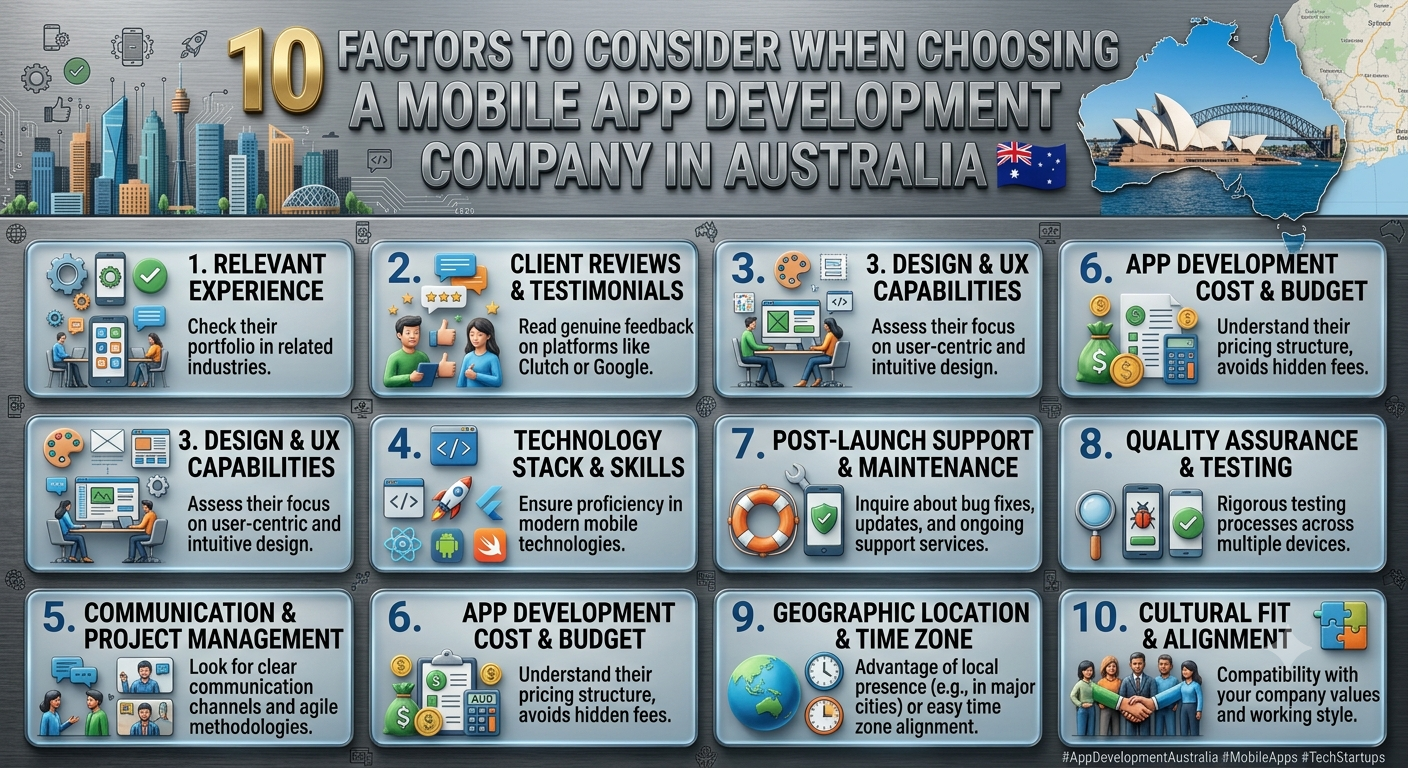
How to Choose the Perfect Mobile App Development Company in Australia: A Complete Guide for Businesses

Choosing the right Mobile app development company in Australia is an important decision for any business planning to build a mobile application. Whether you are launching a new digital product, creating an app for customers, or modernising an existing business process, the development partner you choose can directly affect the app’s quality, security, scalability, cost and long-term performance.

With many mobile app developers in Australia offering different technologies, pricing models and development approaches, comparing companies based only on price is rarely enough. Businesses need to evaluate technical expertise, relevant experience, communication, design capabilities, security, project management and ongoing support.

This guide explains the key factors Australian businesses should consider when choosing a mobile app development company.

Why Choosing the Right Mobile App Development Company Matters

A mobile application is more than just a piece of software. It can become an important part of your customer experience, sales strategy or internal business operations.

The right development partner can help you:

  • Turn your business idea into a practical mobile application
  • Select suitable technologies and development frameworks
  • Create a user-friendly mobile experience
  • Integrate the app with existing business systems
  • Build secure and scalable software
  • Launch the application efficiently
  • Maintain and improve the app after launch
  • On the other hand, choosing a development company without properly evaluating its capabilities can lead to unclear requirements, development delays, unexpected costs, technical problems and expensive redevelopment.

For Australian businesses, working with a development partner that understands your market, customers and business requirements can make the development process significantly easier.

Top Factors Choosing The Mobile App Development Company

Native vs Cross-Platform App Development

Australian businesses often need to decide whether to develop separate native applications or use a cross-platform framework.

Native App Development

Native applications are developed specifically for a particular operating system.

For example:

  • iOS applications can be developed using Swift.
  • Android applications can be developed using Kotlin.

Native development can provide strong platform integration and performance, particularly for applications requiring advanced device-specific functionality.

Cross-Platform App Development

Cross-platform technologies such as Flutter and React Native allow businesses to develop applications for multiple platforms using a shared codebase.

Potential advantages include:

  • Faster development
  • Code reuse
  • Easier maintenance
  • Potentially lower development costs
  • Simpler multi-platform deployment

The best option depends on your business requirements. A professional app development company in Australia should assess your project before recommending an approach.

Assess Their UI/UX Design Capabilities

A technically powerful application can still fail if users find it difficult to navigate.

Ask whether the development company provides UI/UX design as part of its services or works with dedicated designers.

A strong mobile app design process should consider:

  • User journeys
  • Navigation
  • Accessibility
  • Mobile usability
  • Screen layouts
  • Interaction design
  • Branding
  • Prototyping
  • User testing

The goal should be to create an application that is easy for your customers or employees to understand and use.

Understand Their Development Process

Before signing a contract, ask the company to explain how it manages projects.

A structured process may include:

  1. Business and technical discovery
  2. Requirements gathering
  3. User experience planning
  4. UI design
  5. Technical architecture
  6. Development
  7. Testing
  8. Deployment
  9. Monitoring
  10. Ongoing maintenance

Ask how often you will receive project updates and how changes to requirements will be handled.

Clear processes reduce misunderstandings and make it easier to track project progress.

Check Their Security Practices

Mobile applications can process sensitive customer, business and financial information. Security should therefore be considered from the beginning of development rather than added at the end.

Ask potential developers about:

  • Secure authentication
  • Data encryption
  • API security
  • Secure database architecture
  • Access controls
  • Vulnerability testing
  • Secure payment integrations
  • Data protection
  • Security updates

Australian businesses should also consider their specific legal, regulatory and industry requirements when handling customer information.

A development company should be able to explain how security will be incorporated throughout the application lifecycle.

Look at Their Integration Capabilities

Many business applications need to communicate with existing software.

For example, a mobile application may need to connect with:

  • CRM platform
  • ERP system
  • Accounting software
  • Ecommerce platforms
  • Payment gateways
  • Customer databases
  • Cloud services
  • Marketing platforms
  • Internal business systems

This is why custom mobile app development in Australia often requires more than mobile development alone.

Ask prospective developers about their experience with APIs, third-party systems and custom integrations.

Consider Scalability

Your application may start with a small number of users but grow significantly after launch.

The development architecture should therefore be capable of supporting future growth.

Discuss:

  • Expected user numbers
  • Cloud infrastructure
  • Database architecture
  • API performance
  • Application monitoring
  • Feature expansion
  • Multi-region requirements
  • Future integrations

A scalable architecture can make future development easier and help prevent expensive technical redevelopment.

Compare Pricing Carefully

Cost is an important factor, but the cheapest development quote is not necessarily the best option.

Mobile app development costs can vary considerably depending on:

  • Application complexity
  • Number of platforms
  • Design requirements
  • Backend development
  • Integrations
  • Security requirements
  • Third-party services
  • Development team structure
  • Testing requirements
  • Ongoing maintenance

When comparing quotes, make sure you understand exactly what is included.

Ask whether the quoted price covers:

  • UI/UX design
  • Development
  • Testing
  • Deployment
  • App store submission
  • Backend infrastructure
  • Third-party integrations
  • Maintenance
  • Post-launch support

A transparent proposal makes it easier to compare providers fairly.

Evaluate Post-Launch Support and Maintenance

Launching your application is not the end of development.

Mobile operating systems, devices, security requirements and third-party services change over time. Your application may also need new features based on customer feedback.

Ask whether the company provides:

  • Bug fixes
  • Performance monitoring
  • Security updates
  • OS compatibility updates
  • Feature enhancements
  • Technical support
  • Application maintenance

Long-term support can help keep your application reliable after launch.

How Much Does Mobile App Development Cost in Australia?

There is no single price for developing a mobile application because every project has different requirements.

A simple application with limited functionality may require considerably less development work than a complex platform involving multiple user types, real-time functionality, payment processing, APIs and cloud infrastructure.

Instead of focusing only on the headline price, Australian businesses should compare the total project scope and expected business value.

Before requesting quotes, prepare information about:

  • Target users
  • Core features
  • Required platforms
  • Design requirements
  • Integrations
  • Security requirements
  • Expected launch date
  • Future functionality

The more clearly the requirements are defined, the easier it is for development companies to provide meaningful estimates.

How Long Does It Take to Build a Mobile App?

The development timeline depends on the application’s complexity.

A typical project may involve:

Discovery → UX/UI Design → Development → Testing → Deployment → Maintenance

Simple applications can be developed relatively quickly, while larger applications may require several development phases and significantly more testing.

Factors that can affect the timeline include:

  • Number of platforms
  • Number of features
  • Design complexity
  • Backend requirements
  • API integrations
  • Third-party services
  • Testing requirements
  • Security requirements
  • Client feedback and approvals

A reliable development company should provide a realistic project timeline after understanding your requirements.

Red Flags to Avoid When Hiring an App Development Company

Be cautious if a company:

  • Promises an unrealistically short development timeline
  • Provides an unusually low quote without explaining the scope
  • Cannot demonstrate relevant previous work
  • Avoids discussing security
  • Cannot clearly explain its development process
  • Has unclear ownership arrangements
  • Provides little information about post-launch support
  • Does not communicate project risks
  • Cannot explain its recommended technology choices

A professional development partner should be transparent about both opportunities and potential challenges.

A Simple Checklist for Australian Businesses

Before choosing a mobile app development company, evaluate:

  • Relevant mobile development experience
  • Strong portfolio
  • iOS and Android capabilities
  • Appropriate technology expertise
  • UI/UX design capabilities
  • Secure development practices
  • API and integration expertise
  • Scalable architecture
  • Transparent pricing
  • Clear project timeline
  • Defined communication process
  • Post-launch support
  • Clear intellectual property ownershipUsing this checklist can help Australian businesses compare development providers more effectively.

Why Choose Webbrains for Mobile App Development in Australia?

For businesses looking for mobile app development services in Australia, Webbrains can help turn an application concept into a practical digital solution.

Our approach focuses on understanding business requirements before selecting the appropriate technology and development strategy. This can include application planning, UI/UX design, custom development, integrations, testing, deployment and ongoing support.

Whether you are a startup developing a new digital product or an established Australian business looking to improve an existing process, the right development strategy can help create an application that is secure, scalable and aligned with your business objectives.

Frequently Asked Questions

How do I choose the best mobile app development company in Australia?

Compare companies based on relevant experience, portfolio quality, technical capabilities, development process, security, communication, pricing, scalability and post-launch support. Choose the company that best matches your business requirements rather than simply selecting the lowest quote.

What should I look for in an Australian mobile app developer?

Look for experience with your type of application, strong technical skills, a proven portfolio, good communication, secure development practices, integration expertise and ongoing maintenance capabilities.

How much does mobile app development cost in Australia?

The cost varies depending on application complexity, platforms, features, design, integrations, security requirements and development time. A detailed project scope is required to obtain a meaningful estimate.

Should I develop an iOS or Android app first?

The answer depends on your target customers and business objectives. Analyse your audience, market opportunity, required functionality and budget before deciding which platform to prioritise.

Is Flutter suitable for mobile app development?

Flutter can be suitable for many businesses that want to develop applications for multiple platforms using a shared codebase. However, the right technology should be selected based on the application’s functionality, performance and long-term requirements.

Do mobile apps require ongoing maintenance?

Yes. Mobile applications may require updates for new operating-system versions, security improvements, bug fixes, performance optimisation and new features.

How long does it take to develop a mobile application?

The timeline depends on the scope and complexity of the application. Requirements, design, development, integrations, testing and deployment all influence the final timeline.

Final Thoughts

Choosing the right mobile app development company in Australia requires more than comparing prices. Businesses should evaluate technical expertise, relevant experience, design capabilities, security, integrations, scalability, communication and long-term support.

A well-defined development process and a suitable technology strategy can reduce project risks and create a stronger foundation for future growth.

Before selecting a development partner, clearly define your objectives, compare multiple providers and ask detailed questions about their experience, process, pricing and support.

For Australian businesses planning a new mobile application, choosing the right development partner can be one of the most important decisions in turning a digital idea into a successful product.

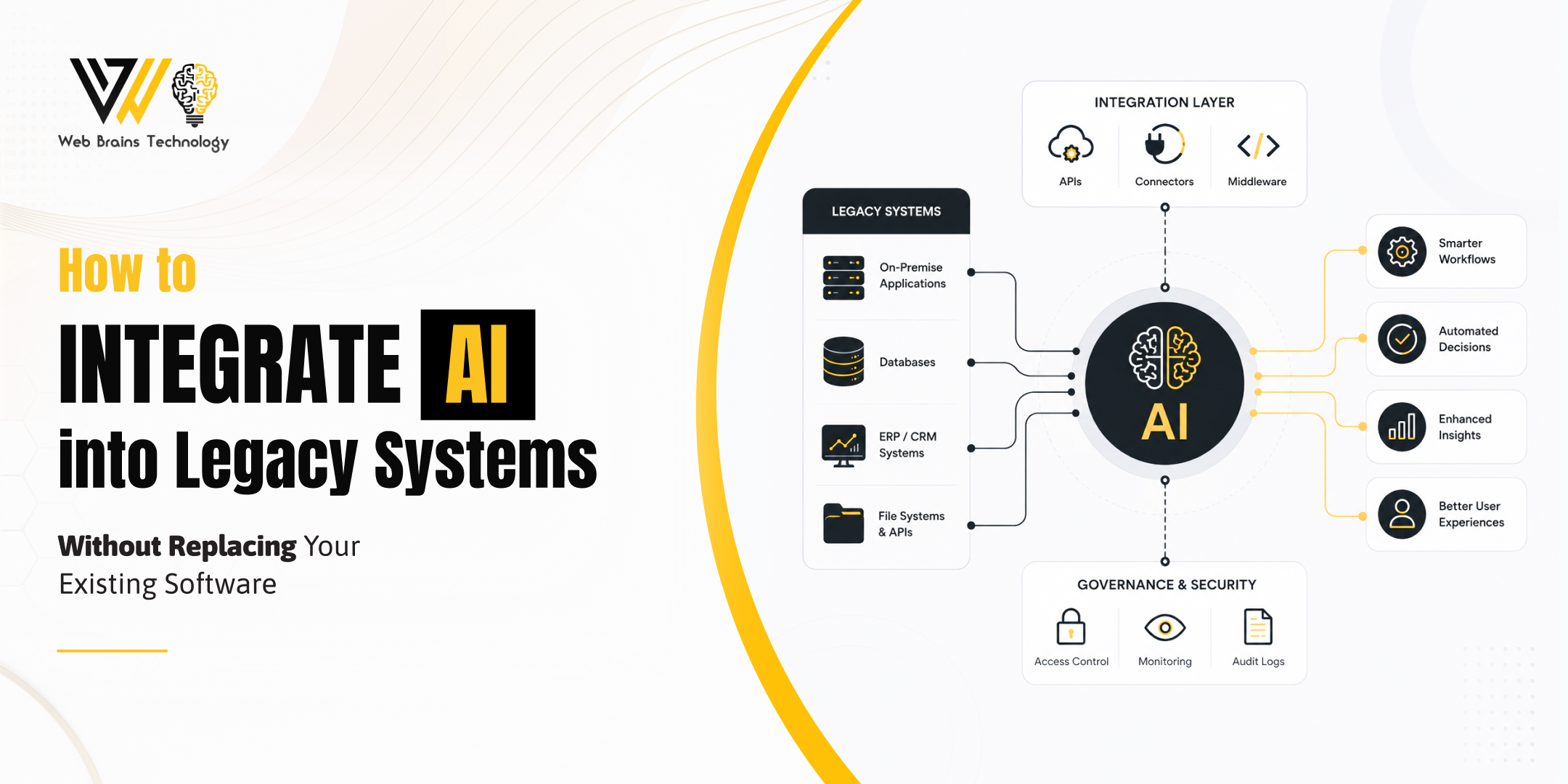
How to Integrate AI into Legacy Systems Without Replacing Your Existing Software

Modern businesses are under increasing pressure to adopt artificial intelligence (AI) to stay competitive. From automating repetitive tasks to improving customer experiences and making data-driven decisions, AI has become a practical business tool rather than a futuristic concept. However, many Australian organisations still depend on legacy software that powers their daily operations.

The challenge is clear—how do you benefit from AI without replacing systems that have supported your business for years?

Fortunately, replacing your existing software isn’t the only option. With the right AI integration for legacy systems, businesses can introduce intelligent capabilities into their current applications without the cost, disruption, and risks associated with a complete software rebuild.

Whether you’re running an ERP, CRM, finance platform, manufacturing system, healthcare application, or custom enterprise software, modern AI technologies can be integrated to enhance functionality while protecting your existing investment.

In this guide, you’ll learn how Australian businesses can modernise legacy systems using AI, the available integration methods, key business benefits, common challenges, and practical strategies for implementing AI successfully.

What Is AI Integration for Legacy Systems?

AI integration for legacy systems is the process of connecting artificial intelligence technologies with existing software applications to improve automation, analytics, decision-making, and operational efficiency without replacing the entire platform.

Instead of rebuilding your software from scratch, AI services can work alongside your existing infrastructure using technologies such as:

  • APIs
  • Middleware
  • Machine learning models
  • Large Language Models (LLMs)
  • AI Agents
  • Predictive Analytics
  • Intelligent Automation
  • Natural Language Processing (NLP)

This allows organisations to unlock new capabilities while continuing to use the software they already trust.

For example, an Australian logistics company using a 15-year-old inventory system can integrate AI to:

  • Predict inventory shortages
  • Automate purchase recommendations
  • Forecast customer demand
  • Optimise delivery schedules
  • Detect supply chain risks

The underlying software remains the same, but its capabilities become significantly more intelligent.

Why Australian Businesses Still Depend on Legacy Systems

Despite rapid advancements in cloud computing and AI, legacy software continues to play a vital role across many Australian industries.

Businesses have often invested years of development, customisation, employee training, and operational processes into these systems. Replacing them can introduce significant costs and business disruption.

Common industries still relying on legacy systems include:

  • Financial Services
  • Healthcare
  • Manufacturing
  • Government
  • Retail
  • Mining
  • Construction
  • Logistics
  • Education
  • Professional Services

Many of these platforms still perform their core functions reliably. The challenge isn’t that they’re unusable—it’s that they weren’t designed to support modern AI capabilities.

Why Rebuilding Existing Software Isn’t Always the Best Choice

Many business leaders assume adopting AI means replacing everything they currently use.

In reality, complete software redevelopment often introduces unnecessary complexity.

Some of the biggest challenges include:

High Development Costs

Building enterprise software from scratch can require substantial investment, particularly when multiple departments rely on the same platform.

Long Project Timelines

Large redevelopment projects often take months or even years before businesses see measurable value.

Business Disruption

Replacing familiar systems requires staff retraining, process changes, data migration, and operational adjustments.

Data Migration Risks

Moving years of business-critical information into new platforms always introduces potential security, compliance, and accuracy concerns.

Employee Resistance

Teams are often comfortable using existing systems. A complete replacement may reduce productivity during the transition period.

Instead of accepting these risks, Australian organisations increasingly prefer integrating AI into existing software while keeping core business processes intact.

Benefits of AI Integration for Legacy Systems

Adding AI to your existing applications provides measurable business value while reducing implementation risks.

Improve Operational Efficiency

AI automates repetitive administrative tasks that consume valuable employee time.

Examples include:

  • Data entry
  • Invoice processing
  • Customer enquiries
  • Report generation
  • Email categorisation
  • Workflow approvals

Employees can then focus on higher-value work requiring strategic thinking and customer engagement.

Make Better Business Decisions

Legacy systems often store vast amounts of valuable business data.

AI analyses this information to uncover trends that would otherwise remain hidden.

Businesses can use predictive analytics to:

  • Forecast sales
  • Identify customer behaviour
  • Predict maintenance requirements
  • Detect financial risks
  • Optimise inventory

This enables faster, more informed decision-making.

Enhance Customer Experiences

AI-powered chatbots, recommendation engines, and intelligent customer support improve service quality without replacing existing CRM systems.

Australian businesses can provide:

  • 24/7 customer support
  • Faster response times
  • Personalised recommendations
  • Automated appointment scheduling
  • Intelligent self-service options

This leads to higher customer satisfaction while reducing operational costs.

Extend the Life of Existing Software

Rather than discarding software that still performs well, AI integration adds new capabilities and extends its lifespan.

Businesses preserve previous technology investments while remaining competitive in a rapidly evolving market.

Increase Productivity

AI reduces manual workloads by automating repetitive processes across departments.

Examples include:

  • HR onboarding
  • Payroll verification
  • Procurement
  • Sales forecasting
  • Document processing
  • Compliance reporting

This can improve productivity while allowing existing teams to focus on higher-value activities.

Strengthen Competitive Advantage

Businesses that adopt AI earlier often gain significant advantages through:

  • Faster decision-making
  • Improved customer experiences
  • Better operational efficiency
  • Reduced costs
  • More accurate forecasting
  • Higher employee productivity

Rather than falling behind competitors, AI integration helps businesses remain innovative while leveraging existing technology investments.

How Much Does AI Integration Cost in Australia?

The cost of integrating AI into legacy systems depends on factors such as the following:

  • Complexity of existing software
  • Number of systems involved
  • Data quality and availability
  • Required AI capabilities
  • Integration method (API, middleware, microservices, AI agents)
  • Security and compliance requirements
  • Custom development needs

Rather than focusing only on upfront costs, businesses should evaluate the long-term return on investment (ROI). AI integration can help reduce manual effort, support faster decision-making, improve customer service and increase operational efficiency.

For an accurate estimate, organisations should begin with a technical assessment of their current systems and clearly define business objectives before implementation.

Signs Your Legacy System Is Ready for AI Integration

Not every organisation needs a complete digital transformation. In many cases, existing software is an excellent candidate for AI enhancement.

Your legacy system may be ready for AI integration if:

  • Employees spend significant time on repetitive manual tasks.
  • Business reports take hours or days to compile.
  • Customer enquiries overwhelm support teams.
  • Decision-making relies heavily on manual data analysis.
  • Existing software stores valuable historical business data.
  • Workflows involve multiple manual approvals.
  • Demand forecasting is inaccurate.
  • Your software supports APIs or can connect through middleware.
  • Leadership wants AI capabilities without replacing core systems.

If several of these challenges sound familiar, integrating AI into your existing software can deliver immediate operational improvements while avoiding the costs of full system replacement.

How to Choose the Right AI Integration Partner in Australia

Implementing AI into legacy systems is not just a technology project—it’s a business transformation initiative. The success of your AI integration depends on choosing a partner who understands enterprise software, cloud architecture, data security, and the practical challenges of modernising existing applications.

When evaluating AI integration services in Australia, consider the following factors.

Industry Experience

Look for a technology partner with experience delivering AI integration projects across industries such as healthcare, finance, manufacturing, retail, logistics, and professional services.

Industry-specific knowledge helps ensure the AI solution aligns with your business processes, compliance requirements, and operational goals.

Expertise in Legacy System Modernisation

Not every AI development company has experience working with older enterprise systems.

Choose a team with expertise in:

  • Legacy software modernisation
  • Enterprise application integration
  • API development
  • Middleware solutions
  • Cloud migration
  • AI implementation
  • Custom software development

This combination ensures your existing software can be enhanced without unnecessary redevelopment.

Security and Compliance

AI systems often process sensitive business and customer information.

Your technology partner should follow best practices for:

  • Secure API development
  • Data encryption
  • Identity and access management
  • Australian Privacy Act compliance
  • Industry-specific regulatory requirements
  • Cloud security

Protecting your data is just as important as delivering AI functionality.

Scalable AI Solutions

Your business requirements will evolve over time.

Select an AI integration partner that designs scalable solutions capable of supporting:

  • Future AI models
  • Increased data volumes
  • Business growth
  • Multi-platform integrations
  • Additional automation opportunities

Scalable architecture protects your long-term technology investment.

Ongoing Support and Optimisation

AI integration is not a one-time project.

Continuous monitoring, model improvements, system updates, and performance optimisation help ensure long-term success.

A reliable AI consulting partner should provide the following:

  • Technical support
  • Performance monitoring
  • AI model optimisation
  • Security updates
  • Continuous improvement recommendations

FAQs

Can AI be integrated into legacy systems?

Yes. Most legacy systems can integrate with AI using APIs, middleware, microservices, or custom connectors. This allows businesses to add intelligent capabilities without replacing their existing software.

Do I need to rebuild my software to use AI?

No. In many cases, AI can be added to existing enterprise applications without a complete rebuild. The best integration approach depends on your software architecture, business goals, and technical environment.

Which industries benefit most from AI integration?

AI integration delivers value across a wide range of Australian industries, including healthcare, finance, manufacturing, retail, logistics, education, professional services, and government.

How long does AI integration take?

Project timelines vary depending on system complexity, data readiness, and the required AI capabilities. Simple API integrations may be completed relatively quickly, while enterprise-wide modernisation projects typically require a phased implementation.

What are the biggest challenges when integrating AI into legacy systems?

Common challenges include outdated infrastructure, poor data quality, integration complexity, cybersecurity requirements, and user adoption. These can be addressed through careful planning, technical assessments, and phased implementation.

How much does AI integration cost in Australia?

The cost depends on factors such as the complexity of your existing systems, integration methods, custom development requirements, data preparation, and project scope. A technical discovery phase is the best way to estimate costs accurately.

Why should businesses choose AI integration instead of replacing their software?

AI integration allows businesses to modernise existing applications, reduce costs, minimise disruption, preserve historical data, and accelerate digital transformation without the risks associated with a complete software replacement.

Conclusion

Artificial intelligence is transforming how organisations operate, but adopting AI does not mean abandoning the software that already supports your business.

By integrating AI into legacy systems, Australian businesses can unlock automation, predictive analytics, intelligent decision-making, and enhanced customer experiences while protecting years of investment in existing technology.

Whether your goal is to streamline operations, improve productivity, enhance customer service, or accelerate digital transformation, AI integration for legacy systems offers a practical and cost-effective path forward.

With the right strategy, an experienced implementation partner, and a phased approach, organisations can modernise their software ecosystem without the expense and disruption of rebuilding from scratch.

What Is AI Automation? Transform Your Business with AI Automation in Australia

Artificial Intelligence (AI) is no longer a futuristic concept—it has become a practical business tool that is transforming how organisations operate. Across Australia, businesses of every size are embracing AI automation to eliminate repetitive tasks, improve productivity, enhance customer experiences, and make smarter decisions using real-time data.

Whether you’re a startup looking to automate customer support, an eCommerce retailer aiming to streamline order processing, or a large enterprise modernising legacy workflows, AI automation can help your business work faster, smarter, and more efficiently.

Unlike traditional automation, which follows fixed rules and predefined workflows, AI automation combines machine learning, natural language processing (NLP), computer vision, and predictive analytics to analyse data, understand context, and make intelligent decisions. This allows businesses to automate more complex processes that previously required human judgement.

According to industry reports, Australian organisations are rapidly increasing investment in AI technologies to remain competitive, reduce operational costs, and improve customer satisfaction. As AI capabilities continue to evolve, automation is becoming a strategic necessity rather than a competitive advantage.

In this guide, you’ll learn:

  • What AI automation is and why it matters
  • How AI automation works
  • Different types of AI automation
  • Real-world AI automation examples
  • Business benefits for Australian organisations
  • The future of AI-powered business automation

Whether you’re exploring AI for the first time or planning your digital transformation strategy, this guide will help you understand how AI automation can create measurable business value.

What Is AI Automation?

AI automation is the use of artificial intelligence technologies to automate business processes, repetitive tasks, and decision-making activities with minimal human intervention.

Instead of simply following a predefined sequence of rules, AI-powered systems can analyse information, recognise patterns, learn from historical data, and continuously improve their performance over time.

For example:

  • Automatically responding to customer enquiries using AI chatbots.
  • Reading and processing invoices without manual data entry.
  • Predicting customer demand before inventory runs low.
  • Routing support tickets based on urgency and sentiment.
  • Detecting fraudulent financial transactions in real time.

This makes AI automation far more flexible than conventional automation software.

Traditional Automation vs AI Automation

Traditional automation works best when every step follows predictable rules. If a process changes or an unexpected scenario occurs, human intervention is often required.

AI automation, on the other hand, can adapt to changing conditions by analysing data and making informed decisions. It can understand language, recognise images, predict future outcomes, and continuously optimise workflows based on new information.

This capability allows Australian businesses to automate complex operations while improving speed, accuracy, and customer experiences.

Key Technologies Behind AI Automation

Several advanced technologies work together to power modern AI automation solutions.

Machine Learning (ML)

Machine learning enables AI systems to identify patterns within large datasets and improve performance without being explicitly programmed for every scenario.

Examples include:

  • Sales forecasting
  • Customer behaviour prediction
  • Product recommendations
  • Demand planning
Natural Language Processing (NLP)

Natural Language Processing allows computers to understand and respond to human language.

Businesses commonly use NLP for:

  • AI chatbots
  • Email automation
  • Virtual assistants
  • Document analysis
  • Customer support
Computer Vision

Computer vision enables machines to interpret images and videos.

Common applications include:

  • Manufacturing quality inspections
  • Warehouse inventory management
  • Identity verification
  • Medical image analysis
Predictive Analytics

Predictive analytics uses historical data and AI models to forecast future outcomes.

Businesses use predictive analytics for:

  • Sales forecasting
  • Customer retention
  • Risk management
  • Fraud detection
  • Inventory optimisation
Intelligent Decision-Making

Modern AI automation platforms combine multiple AI technologies to recommend or execute decisions automatically based on business rules and real-time information.

This reduces manual effort while improving operational efficiency.

How Does AI Automation Work?

AI automation follows a structured process that transforms raw business data into intelligent actions.

Understanding this workflow helps businesses identify where automation can deliver the greatest value.

Step 1: Collect Business Data

Every AI automation system begins by collecting information from multiple sources, including:

  • CRM platforms
  • ERP systems
  • Accounting software
  • Emails
  • Customer support platforms
  • Websites
  • IoT devices
  • Cloud applications

The quality of this data directly impacts the accuracy of AI-generated insights.

Step 2: Process and Analyse Information

AI algorithms analyse the collected data to identify trends, relationships, and patterns that would be difficult for humans to detect manually.

For example, an AI system might identify:

  • Customers likely to cancel subscriptions.
  • Products with increasing demand.
  • High-risk financial transactions.
  • Frequently asked customer questions.
Step 3: Make Intelligent Decisions

Unlike traditional software, AI evaluates multiple variables before selecting the most appropriate action.

Examples include:

  • Prioritising urgent support tickets.
  • Automatically approving invoices.
  • Recommending products.
  • Assigning sales leads.
  • Detecting fraud.
Step 4: Automate Business Actions

Once a decision has been made, AI can trigger automated workflows such as:

  • Sending emails
  • Updating CRM records
  • Creating invoices
  • Scheduling appointments
  • Processing customer requests
  • Escalating support cases

This significantly reduces manual administration while increasing consistency.

Step 5: Learn and Improve

One of AI automation’s greatest strengths is continuous learning.

As more data becomes available, AI models improve their predictions, recommendations, and decision-making capabilities over time.

This means your automation becomes smarter and more accurate as your business grows.

Types of AI Automation

AI automation can be applied across nearly every business function. The right solution depends on your goals, industry, and operational requirements.

Customer Service Automation

AI-powered chatbots and virtual assistants provide instant responses to customer enquiries, helping businesses deliver 24/7 support while reducing response times.

Common use cases include:

  • Live chat
  • Appointment bookings
  • FAQ responses
  • Ticket routing
  • Customer onboarding
Sales Automation

Sales teams use AI automation to manage repetitive administrative tasks, allowing representatives to focus on building customer relationships.

Examples include:

  • Lead scoring
  • Sales forecasting
  • CRM updates
  • Meeting scheduling
  • Proposal generation
Marketing Automation

AI enables marketers to create personalised customer experiences at scale.

Marketing automation includes:

  • Email campaigns
  • Audience segmentation
  • Content recommendations
  • Advertising optimisation
  • Social media scheduling
Finance Automation

Finance departments use AI to improve efficiency and reduce human error.

Typical applications include:

  • Invoice processing
  • Expense management
  • Financial reporting
  • Fraud detection
  • Payment reconciliation
HR Automation

Human Resources teams increasingly rely on AI to streamline hiring and employee management.

Examples include:

  • Resume screening
  • Candidate matching
  • Employee onboarding
  • Leave management
  • Workforce analytics
Operations Automation

Businesses can automate operational workflows to improve productivity and reduce costs.

Examples include:

  • Inventory management
  • Supply chain optimisation
  • Workflow approvals
  • Asset tracking
  • Production scheduling

Why AI Automation Matters for Australian Businesses

Australian businesses operate in an increasingly competitive environment where customers expect faster service, personalised experiences, and consistent quality.

AI automation helps organisations meet these expectations by reducing repetitive work, improving decision-making, and enabling employees to focus on higher-value activities.

Whether you’re a small business looking to automate daily administrative tasks or an enterprise modernising complex operations, AI automation provides a scalable pathway to greater efficiency, innovation, and long-term growth.

In the next section, we’ll explore real-world examples of AI automation across industries, the key benefits for Australian businesses, and how organisations are using AI to gain a competitive advantage.

Real Examples of AI Automation Across Industries 

Customer Service:

Customer expectations have changed significantly over the past few years. Today’s customers expect instant responses, personalised interactions, and support outside standard business hours.

AI-powered chatbots and virtual assistants help businesses deliver consistent customer service by:

  • Answering frequently asked questions instantly
  • Providing order and delivery updates
  • Booking appointments automatically
  • Routing complex enquiries to the right team
  • Supporting customers 24/7
Sales:

Sales professionals spend a considerable amount of time on administrative work instead of building customer relationships.

AI business automation can streamline sales processes by:

  • Scoring leads based on buying intent
  • Automatically updating CRM records
  • Scheduling follow-up emails
  • Predicting sales opportunities
  • Generating personalised proposals
Marketing:

Modern marketing relies heavily on data. AI automation helps marketing teams analyse customer behaviour and deliver personalised campaigns at scale.

Marketing automation can include:

  • Personalised email marketing
  • Customer segmentation
  • Product recommendations
  • Social media scheduling
  • Content recommendations
  • Campaign performance analysis
Finance:

Financial operations often involve repetitive manual tasks that consume valuable time and increase the risk of human error.

AI automation can simplify finance processes by:

  • Processing invoices
  • Matching payments
  • Detecting fraudulent transactions
  • Forecasting cash flow
  • Automating expense approvals
  • Generating financial reports
Human Resources:

Recruitment and employee management involve numerous repetitive administrative activities.

AI workflow automation helps HR teams by:

  • Screening resumes
  • Matching candidates to job descriptions
  • Scheduling interviews
  • Managing employee onboarding
  • Answering HR-related questions through AI assistants
Healthcare:

Healthcare providers use AI automation to improve patient care while reducing administrative workloads.

Applications include:

  • Appointment scheduling
  • Medical record management
  • Diagnostic assistance
  • Prescription processing
  • Patient follow-up reminders
Manufacturing:

Manufacturers are adopting AI automation to improve production quality and operational efficiency.

Common applications include:

  • Predictive maintenance
  • Quality inspections
  • Inventory management
  • Production planning
  • Supply chain optimisation

What Are the Benefits of AI Automation? 

AI automation delivers measurable benefits across every department of an organisation. Whether you’re a small business or a large enterprise, implementing AI automation can significantly improve operational performance.

Increased Productivity

One of the biggest advantages of AI automation is its ability to eliminate repetitive manual tasks.

Employees spend less time on administrative work and more time on strategic initiatives that drive business growth.

Examples include:
  • Automated data entry
  • Document processing
  • Email management
  • Workflow approvals
  • Report generation
Lower Operating Costs

Manual processes require significant labour and often result in inefficiencies.

AI automation reduces operational costs by:

  • Minimising repetitive work
  • Reducing overtime
  • Improving resource allocation
  • Preventing costly errors
  • Increasing workflow efficiency

For many Australian businesses, AI automation delivers long-term cost savings while supporting business growth.

Improved Accuracy

Human errors are inevitable, particularly when handling large volumes of repetitive work.

AI automation improves accuracy by consistently following predefined workflows while analysing data in real time.

This is particularly valuable for:

  • Finance
  • Healthcare
  • Legal services
  • Logistics
  • Insurance
Faster Decision-Making

AI systems can analyse thousands of data points within seconds, providing actionable insights that help businesses make informed decisions more quickly.

Examples include:

  • Sales forecasting
  • Inventory optimisation
  • Customer behaviour analysis
  • Risk assessment
  • Business intelligence reporting
Better Customer Experience

Customers expect fast, personalised, and reliable service.

AI automation helps businesses deliver the following:

  • Instant support
  • Personalised recommendations
  • Faster response times
  • Accurate information
  • Consistent communication

Improved customer experiences often lead to stronger loyalty, higher retention rates, and increased revenue.

Scalability

As businesses grow, manual processes become increasingly difficult to manage.

AI automation allows organisations to scale operations without proportionally increasing staffing costs.

Whether processing hundreds or thousands of customer requests daily, AI automation maintains consistent performance.

Smarter Business Insights

AI analyses historical and real-time data to identify patterns that support strategic planning.

Businesses gain insights into:

  • Customer purchasing behaviour
  • Sales performance
  • Marketing effectiveness
  • Inventory trends
  • Operational bottlenecks

These insights help leaders make more informed business decisions.

AI Automation vs RPA vs BPA vs Intelligent Automation vs Agentic AI 


As businesses explore digital transformation, it’s common to come across terms like Robotic Process Automation (RPA), Business Process Automation (BPA), Intelligent Automation (IA), and Agentic AI. While these technologies are related, they solve different business challenges.

Understanding the differences helps Australian businesses choose the right automation strategy.


Technology Best For Uses AI? Learns from Data? 
Business Process Automation (BPA) Automating end-to-end business workflows No No 
Robotic Process Automation (RPA) Repetitive rule-based tasks No No 
AI Automation Intelligent decision-making and data analysis Yes Yes 
Intelligent Automation (IA) Combining AI with RPA for smarter workflows Yes Yes 
Agentic AI Autonomous AI systems that plan, reason and execute tasks Yes Continuously 


How to Build an AI Automation in Make 

Make (formerly Integromat) is a visual automation platform that allows businesses to connect applications and create AI-powered workflows without extensive coding.

Below is a practical framework for building an AI automation.

Step 1: Identify a Repetitive Business Process

Choose a process that consumes time and follows a repeatable workflow.

Examples include:

  • Lead qualification
  • Customer enquiry responses
  • Invoice processing
  • Appointment scheduling
  • Document generation
Step 2: Connect Your Applications

Integrate your business tools such as:

  • CRM
  • Email platform
  • Google Workspace
  • Microsoft 365
  • Accounting software
  • Slack
  • HubSpot
  • Shopify
  • Salesforce
Step 3: Add an AI Model

Connect an AI model capable of handling natural language, summarisation, classification, or content generation.

Common use cases include:

  • Email summarisation
  • Customer sentiment analysis
  • Lead qualification
  • Proposal generation
  • FAQ responses
Step 4: Build the Workflow

Create automation scenarios using triggers and actions.

Example:

Customer enquiry submitted

AI analyses the enquiry

Classifies request

Creates CRM record

Assigns team member

Sends personalised response

Notifies sales team

Step 5: Test and Optimise

Before deployment:

  • Test multiple scenarios.
  • Check data accuracy.
  • Monitor workflow performance.
  • Optimise prompts.
  • Improve response quality.

AI automation performs best when continuously monitored and refined.

Which AI Is Best for Automation? 

There is no single AI platform that suits every organisation. The best solution depends on your business goals, existing technology stack, budget, and automation requirements.

Here are some of the leading AI platforms used by businesses:

OpenAI

Best for:

  • Customer support
  • Content generation
  • AI assistants
  • Knowledge management
  • Workflow automation
Microsoft Copilot

Best for:

  • Microsoft 365 users
  • Enterprise productivity
  • Document automation
  • Internal knowledge search
Google Gemini

Best for:

  • Google Workspace
  • Data analysis
  • Research
  • Productivity workflows
Anthropic Claude

Best for:

  • Long-document processing
  • Policy analysis
  • Knowledge management
  • Enterprise documentation
Zapier AI

Best for:

  • Quick automation
  • CRM integration
  • Marketing workflows
  • Productivity automation

When selecting an AI automation platform, consider:

  • Ease of integration
  • Security
  • Scalability
  • Customisation
  • Compliance
  • Ongoing support
  • Total cost of ownership

What’s Next: Agentic AI Automation

The future of business automation is moving beyond simple workflows toward autonomous AI systems capable of managing complex objectives.

Agentic AI will enable businesses to automate end-to-end operations that currently require multiple people and software systems.

Future capabilities may include:

  • Automatically planning marketing campaigns.
  • Managing procurement processes.
  • Coordinating customer support.
  • Analysing business performance.
  • Optimising inventory levels.
  • Scheduling resources.
  • Recommending strategic business actions.

Instead of asking AI to complete one task at a time, businesses will increasingly assign objectives, allowing AI to determine the most effective way to achieve them while keeping human oversight in place.

Australian organisations investing in AI today will be well positioned to adopt these next-generation capabilities as they mature.

Final Thoughts

AI automation is no longer limited to large enterprises with extensive technology budgets. Businesses of all sizes across Australia are using AI to streamline operations, improve customer experiences, reduce costs, and increase productivity.

Whether you’re beginning with a simple customer support chatbot or implementing intelligent workflows across multiple departments, the key to success is identifying high-impact processes and introducing automation strategically.

By combining the right AI tools with well-designed workflows and quality data, organisations can unlock measurable efficiency gains while creating more time for innovation and growth.

As AI technology continues to evolve, businesses that embrace automation today will be better prepared for the next generation of intelligent, autonomous operations.

Ready to Transform Your Business with AI Automation?

Looking to automate repetitive tasks, improve operational efficiency, or integrate AI into your existing business systems?

Our AI automation specialists help Australian businesses design, implement, and optimise tailored AI solutions that deliver measurable results.

Whether you need workflow automation, AI-powered customer support, document processing, CRM automation, or enterprise AI integration, we can help you build scalable solutions that support long-term growth.

Contact us today to discover how AI automation can help your business save time, reduce costs, and stay ahead of the competition.


Frequently Asked Questions


What is AI automation?

AI automation combines artificial intelligence with workflow automation to perform tasks, analyse data, make decisions, and continuously improve business processes with minimal human intervention.

How does AI automation work?

AI automation collects data, analyses it using AI models, makes intelligent decisions, and triggers automated actions across connected business systems.

What industries benefit from AI automation?

Healthcare, finance, retail, manufacturing, construction, education, logistics, professional services, real estate, and eCommerce all use AI automation to improve efficiency and customer experiences.

Is AI automation suitable for small businesses?

Yes. Many affordable AI automation platforms allow small and medium-sized businesses to automate repetitive tasks without significant upfront investment.

What is the difference between AI automation and RPA?

RPA automates repetitive rule-based tasks, while AI automation can understand information, learn from data, and make intelligent decisions.

Is AI automation secure?

When implemented correctly with appropriate security controls and compliance measures, AI automation can securely process business data and support regulatory requirements.

How much does AI automation cost in Australia?

Costs vary depending on business size, automation complexity, software licensing, and implementation requirements. Many businesses start with small automation projects and expand over time.

Does AI automation replace employees?

AI automation is designed to automate repetitive tasks, allowing employees to focus on higher-value work such as customer engagement, strategy, creativity, and decision-making.

What is Agentic AI?

Agentic AI is an advanced form of AI capable of planning, reasoning, and completing multi-step objectives with minimal human intervention, representing the next evolution of intelligent business automation.